For the adult organizing one visit, not for tracking who attends
Plan one guest speaker visit on a shared board, from invitation to thank-you note
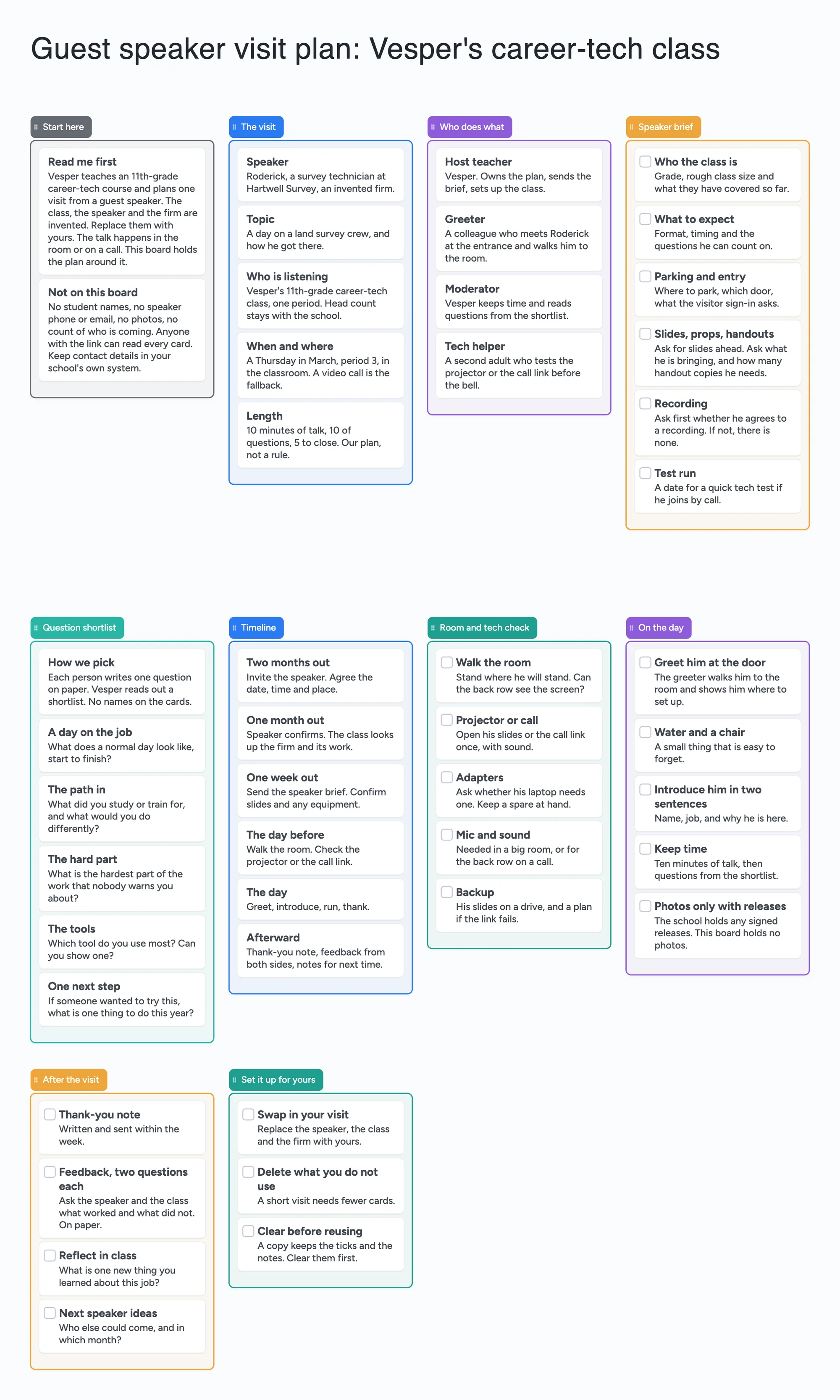
A guest speaker visit is a few weeks of small jobs shared by two or three adults: the invitation, a brief for the speaker, a greeter, a tech check, a thank-you. Instaboard, the board tool we make, lets several people edit one board together, and this page offers one set up for a single visit. The example has Vesper, who teaches an 11th-grade career-tech course, and Roderick, a survey technician at an invented firm called Hartwell Survey. The board holds the plan around the visit and nothing else: it does not count who is coming, store anyone's phone number or email, or send reminders. Swap in your own class, speaker and firm.
Opens in your browser. Anyone can view; a free sign-in lets you edit.
Updated
Limits first: what this board won't do
- It does not count or remind. There is no head count, no RSVP list and no reminder. Two adults who share the link have to tell each other when the visit is.
- It holds the plan, not people's details. No speaker phone or email, no student names, no photos. Anyone with the link can read every card, so those stay in your school's or organization's own system.
- One visit per board. A year of speakers is a different job: a sheet with a row per visit does that better.
- The example is fiction. Vesper, Roderick and Hartwell Survey are made up, and the sample questions only show the shape of a shortlist.
- Plan limits: the free plan allows 5 boards, 150 items and 3 pictures per board, and a copy of this board counts as one of the five. A board opens as view-only for people who join until you change Share.
Which visits this fits, and which it doesn't
The board is built for one speaker, one date and a small team of adults: a teacher and a colleague, a club leader and a co-leader, a department and its tech helper. The two sources we read describe the same shape from different places. Ohio University's Event Services checklist is written for any campus event, and "dinner with guest speaker" is one of its examples. The NYC Public Schools Work-Based Learning Toolkit has a guest speaker guide for school staff. Neither is a template you can share and edit with another person, which is the gap the board fills.
| Your visit | Fits the board? | Why |
|---|---|---|
| One speaker for one class or one club meeting | Yes | Everything on the board is one visit's plan |
| A visit by video call | Yes | The tech check and speaker brief have cards for a call link, and the day cards still apply |
| A career day with ten speakers | Not as built | Ten speakers means ten briefs and a schedule; the board has one of each, and ten copies would pass your 5 free boards |
| A public event with registration, catering and a budget | No | Ohio's checklist covers venue, budget, catering and marketing; the board leaves all of those out |
| A speaker series across a year | No | A sheet with one row per visit and a date column does this better |
Swipe the table sideways to see every column.
Our judgement of fit. The Ohio checklist items are from its own page; the board does not copy them.
What one visit costs in free items
Every card and every list is 1 of your 150 free items across all your boards, and the title text box counts too. Arrows, sections and pen strokes don't. Our arithmetic from the example:
- The board as built uses 57 items: 10 lists, 46 cards and 1 title text box.
- Two copies for two visits come to 114 and use 2 of your 5 free boards. Three copies come to 171, past the limit.
- A reused board keeps every tick and note, so clear them first. A short visit can simply delete the cards it doesn't need.
- Pro removes the item limit.
Six steps from two months out to the thank-you note
The NYC toolkit's Coordinator Checklist includes a sample timeline that runs from the start of the school year to a thank-you after the visit. The board's Timeline list follows the same order for one visit rather than a school year:
- Two months out: invite the speaker and agree the date, time and place.
- One month out: the speaker confirms; the class looks up the firm and its work.
- One week out: send the speaker brief and confirm slides and any equipment.
- The day before: walk the room and check the projector or the call link.
- The day: greet, introduce, run, thank.
- Afterward: thank-you note, feedback from both sides, notes for next time.
The board keeps the toolkit's two-month, one-month and one-week steps, drops its start-of-year step and adds a day-before check. The gaps are a guide, not a rule. A visit arranged in two weeks can drop the first two steps.
The speaker brief: six things a visitor needs to hear before the day
The NYC Employer Guest Speaker Tip Sheet tells the speaker to review where to park and enter, to tell the coordinator about needs such as a projector or computer set-up, and to ask how many handouts they'll need. The coordinator checklist says the other side of the same list: share the format, questions to expect, where to park, what visitor procedures apply, and ask permission before recording. The board turns that into a checklist of six cards on the Speaker brief list:
- Who the class is: grade, rough size, what they have covered. The tip sheet tells speakers to link the talk to what the class is working on.
- What to expect: the format, the timing and the questions he can count on.
- Parking and entry: where to park, which door, what the visitor sign-in asks.
- Slides, props, handouts: ask for slides ahead, and how many handout copies are needed.
- Recording: ask first whether the speaker agrees. If not, there is none. The coordinator checklist says to ask for permission to record.
- Test run: a date for a quick tech test if he joins by call.
None of the six asks for the speaker's contact details, because the board does not hold them. Keep the email thread or phone number where you already keep them.
Four roles, so the speaker is never standing in a corridor
The NYC checklist assumes more than one adult on the day. Its coordinator checklist says to arrange for someone to meet the speaker on arrival and walk them to the room, and its online-activity tips say one person may moderate while another monitors the technology. Ohio's day-of list has a step to set up a registration table and/or greet arrivals. The board's Who does what list has four cards:
- Host teacher or organizer: owns the plan and sends the brief.
- Greeter: a colleague who meets the speaker at the entrance.
- Moderator: keeps time and reads questions from the shortlist.
- Tech helper: a second adult who tests the projector or the call link before the bell.
In a small visit one person can hold two roles. The cards are there so nobody assumes someone else is at the door.
Room and tech check: five things to try before the speaker arrives
Ohio's checklist has a "Tech-Check" and facility walk-through in the week before the event, and a day-of line to bring a computer with VGA capabilities at least 30 minutes before guests arrive if you plan to present a slideshow or video, and to test and bring adapters if it has no VGA. The coordinator checklist's online tips say to do a test run with the speaker, preload any slides, and decide who moderates and who handles tech. The board's Room and tech check list is five cards, each one a quick action:
- Walk the room: stand where the speaker will stand and see if the back row can see the screen.
- Projector or call: open his slides or the call link once, with sound.
- Adapters: ask whether his laptop needs one and keep a spare at hand. Our view: Ohio's VGA line is written for its own rooms.
- Mic and sound: needed in a big room, or so the back row can hear on a call.
- Backup: his slides on a drive, and a plan if the link fails.
A question shortlist written on paper, with no names on the cards
The NYC Teacher Tip Sheet says to have students research the speaker's company and prepare at least three questions for the employer. It does not say how to choose among them. The board's version is our own design: each person writes one question on paper, the host reads out a shortlist, and the board keeps only the questions, never who wrote them.
The five question cards on the example are ours, written for an invented survey crew: a day on the job, the path in, the hard part, the tools and one next step. Whether a question is a good one is the host's judgement, and the moderator keeps the time.
What the two sources include that the board leaves out
| Source item | Where it is from | Why the board skips it |
|---|---|---|
| Budget, catering, alcohol application, decorations | Ohio University Event Services checklist | A speaker in a classroom has no catering or budget; the board would show empty cards |
| Flyers, banners, newspaper ads, a campus calendar listing | Ohio University checklist | Publicity for a public event, not for one class |
| Registration table and confirming attendee numbers for catering | Ohio University checklist | The board holds no head counts |
| Photos for the company's website or newsletter, with signed releases | NYC toolkit Coordinator Checklist | The board holds no photos; the card says the school holds any releases |
| Speaker's social media policy and URLs for tagging | NYC toolkit Coordinator Checklist | Outside the visit plan |
| Student Employability Skills Profile updates | NYC toolkit Teacher Tip Sheet | Part of NYC's own program, and it concerns student profiles the board does not hold |
| Press story in the local paper | NYC toolkit Coordinator Checklist | Publicity for a program, not for one visit |
Swipe the table sideways to see every column.
Pages read November 26, 2026. Our summaries of what each item says, not quotations. The Ohio checklist shows no date; the NYC toolkit PDFs show 5th Edition, April 2022.
Leaving these out is a choice for a single class visit. If you are the person running a public event, Ohio's full checklist is the better starting point.
Where the two checklists do this better
| Tool | What it does | Better for |
|---|---|---|
| Ohio University Event Services checklist | Four phases for a campus event: initial planning, week before, day of, post event | A public event with a venue, budget and catering |
| NYC Work-Based Learning Toolkit guest speaker guide | Fact sheet, coordinator checklist, teacher and employer tip sheets, virtual options, student handouts | A school program that runs many visits in a set format, with student reflection forms |
| Instaboard board | One shared board for one visit's plan, editable by everyone you add (free plan: 5 boards, 150 items) | Two or three adults editing one visit's plan on a shared link |
Swipe the table sideways to see every column.
Read November 26, 2026. Our wording, not theirs.
When to print instead
If you are one organizer who wants a printout to carry on the day, the NYC tip sheets are lighter than a board and they are written for exactly that. A board earns its place when the greeter, the tech helper and the host each need to see and tick the same list before the visit.
Making it yours, step by step
- Open the board. The first time you try to type, it asks you to sign in, which is free.
- Replace the speaker, class and firm on The visit list with yours.
- Delete the cards you won't use and write your own date steps on the Timeline.
- Rewrite the question shortlist after the class has written theirs on paper.
- Send the link to the greeter and the tech helper, and switch Share to "Anyone who joins can edit" so they can tick cards. Each of them signs in free once.
- Tell people the date yourself. The board sends no reminders.
Start from the ready board
It opens in your browser in a few seconds, with nothing to install. Sign in for free when you want to save it and share it.
Questions
How far ahead should I invite a guest speaker?
The NYC toolkit's sample timeline says to invite business partners and secure a date, time and location about two months in advance, and to confirm a month ahead. That timeline is written for a school year. For one visit, treat it as a guide and shorten it to what your schedule allows.
What should I tell the guest speaker before the visit?
The class and its grade, what the visit will look like and how long it is, where to park and which door to use, what slides or handouts are needed, whether the visit will be recorded, and a date for a tech test if they join by call. The NYC coordinator checklist and employer tip sheet list the same kinds of things.
Can a guest speaker join by video call?
Yes. The NYC Coordinator Guest Speaker Checklist has tips for an online visit: select and practice the technology, do a test run with the students and the speaker, preload any slides, and decide who moderates and who monitors the technology. The toolkit also lists a virtual options sheet, which we did not read. The board has cards for the call link and the test run.
Should I record the talk?
Only if the speaker agrees. The NYC coordinator checklist says to ask for permission to record and share the presentation with others in the future. The board has a Recording card that says to ask first and to skip recording if the answer is no.
Can the greeter and the tech helper edit the same board?
Yes. Change Share from view to "Anyone who joins can edit", and each person who writes signs in free once. Instaboard sends no reminders, so tell each person the date and their job yourself.
Is Instaboard free?
There is a free plan: 5 boards, 150 cards and items across your account (pen strokes, arrows and sections don't count), and 3 pictures and 1 file per board. Writing on a board takes a free sign-in. Pro removes the item limit and adds invite-only boards: $5 a month billed yearly ($59.99 a year), or $7.99 monthly.
Sources
- Ohio University Event Services: Event Planning Checklist (page shows no date; read November 26, 2026)
- NYC Public Schools Work-Based Learning Toolkit: Guest Speaker Activity Guide (5th Edition, April 2022; read November 26, 2026)
- NYC toolkit: Coordinator Guest Speaker Checklist (PDF, 5th Edition, April 2022; read November 26, 2026)
- NYC toolkit: Teacher Guest Speaker Tip Sheet (PDF, 5th Edition, April 2022; read November 26, 2026)
- NYC toolkit: Employer Guest Speaker Tip Sheet (PDF, 5th Edition, April 2022; read November 26, 2026)