For a novelist, or a novelist and a first reader, keeping a book's state in one place
A novel planner on one shared board: decided, open, next
We make Instaboard, an online board for planning with other people. This page gives you a novel planner already laid out on it, filled in for an invented writer, Ottoline, and her first reader, Matteo. It does one job: it says where the book stands. One list holds what is decided, one holds the questions still open, and others hold the cast, the scenes drafted, the scenes to draft next, what needs rewriting, research, and the next three things to do. It is not your manuscript, it does not count words, and it is not a story-structure template. Open it, swap in your book and send the link to the one person who reads along. If you need a drafting app, a timeline or a series bible, the table further down says what to use.
Opens in your browser. Anyone can view; a free sign-in lets you edit.
Updated
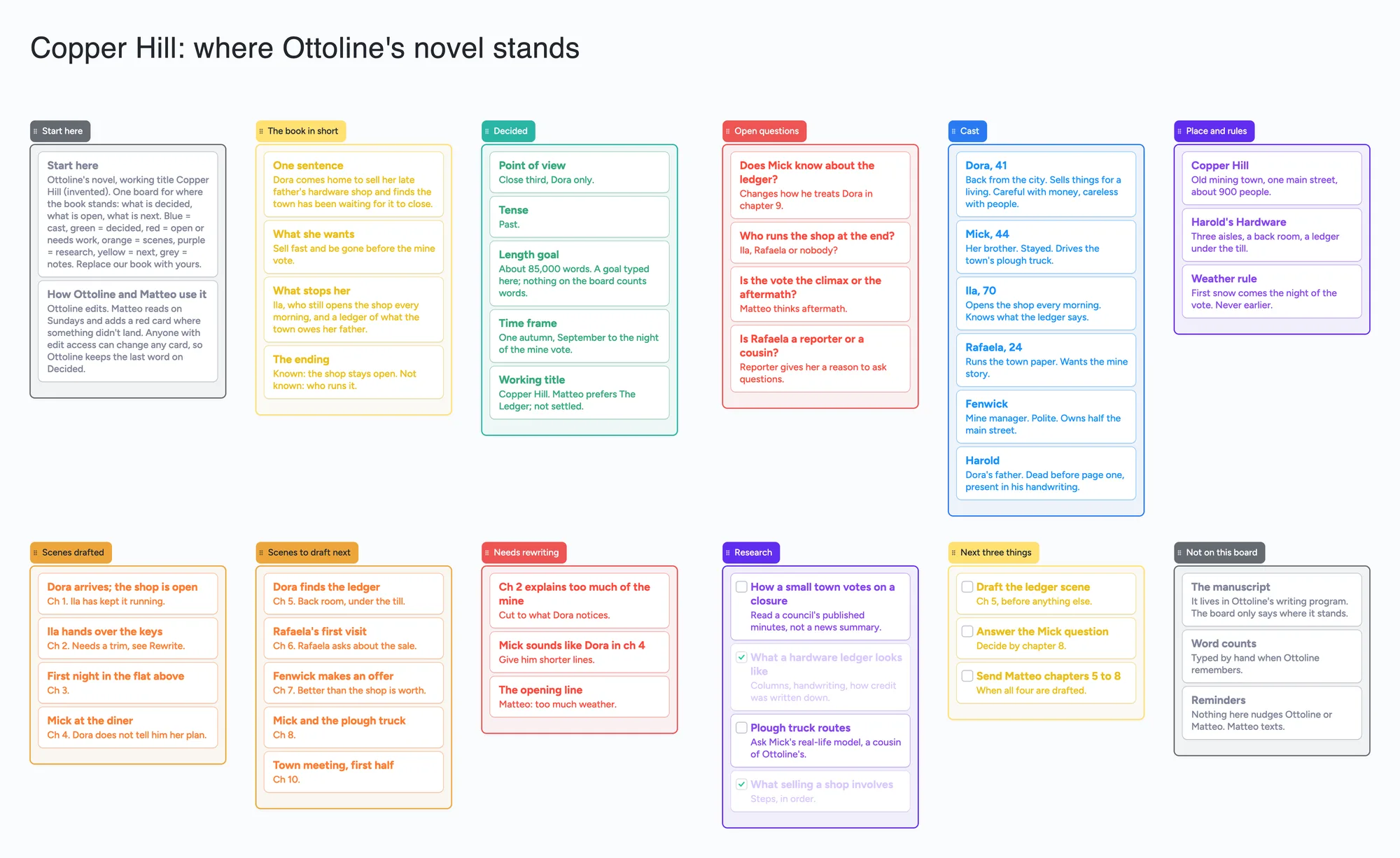
One book's state on one screen, and what the board leaves out
- What it is: the state of one book on one screen. Decided things sit in one list, open questions in another, and every scene is a card that sits in Drafted, Next or Needs rewriting. The example uses 59 of your 150 free items.
- What it isn't: not a manuscript and not a drafting app. It does not count words, hold chapters, keep a timeline or check that your story hangs together. "85,000 words" on the board is a goal Ottoline typed.
- Not a structure template: it does not tell you where a turning point goes. It records the choices you have made about your own book.
- Private pages stay private: a board is shared by link. Keep the manuscript, real names and anything you would not show a stranger off it (more below).
- Free plan: 5 boards, 150 items, 3 pictures per board. Copying the board takes 1 of your 5 boards. Writing on it needs a free sign-in. New boards start with "Anyone who joins can view". Pro removes the 150-item limit and adds invite-only boards (price in the last question).
Decided, open and next: the three states of a book
Most novel planners are built around structure: acts, beats, chapters. Those answer "what happens where". A different question comes up in the middle of a draft: what have I already settled, what is still undecided, and what do I do on Monday. This board is arranged around that second question.
- Decided (green): point of view, tense, length goal, time frame, working title. Short, final and easy to find when you doubt yourself at chapter 9.
- Open questions (red): things you do not know yet, each with one line on why it matters. Ottoline's first card is whether a secondary character knows about a ledger, because it changes how he treats her lead in a later chapter.
- Next (yellow and orange): the next three things to do, and the scenes lined up to draft.
Colour here is only a convention: the Start here card says what each colour means, and you can change it.
Ottoline's board, list by list
The novel is invented: Copper Hill, about a woman who comes home to sell her late father's hardware shop. Read it as two rows of six lists, left to right.
- Start here. Two grey cards: what the colours mean, and how Ottoline and Matteo use the board.
- The book in short. One sentence, what she wants, what stops her, the ending, with one honest line about what is not known yet.
- Decided. Five short cards. The length goal says in its own words that nothing on the board counts words.
- Open questions. Four red cards, each a real fork: does a character know, who runs the shop at the end, is the vote the climax or the aftermath, is a minor character a reporter or a cousin.
- Cast. Six blue cards, a line each. Harold is dead before page one and still has a card, because he is in the plot.
- Place and rules. The town, the shop and one weather rule the book must not break.
- Scenes drafted and Scenes to draft next. One card per scene, with the chapter number in its text. Four are done and five are lined up.
- Needs rewriting. Three notes, each with what to do about it; one is Matteo's reaction to the opening line.
- Research. Four cards with tick boxes, two ticked.
- Next three things. Three tick-box cards. The first says what to do before anything else.
- Not on this board. Three cards that say what the board leaves out: the manuscript, word counts and reminders.
Nothing is linked. Moving a scene from Next to Drafted is a drag, and ticking a card is a tap. The example has no arrows because the planner's job is state, not connections.
What a board can't do
- No manuscript, no drafting. The board holds short notes, not chapters, and has no spell check or formatting for books.
- No word counts. Nothing adds up; every number on the board is typed by hand.
- No timeline axis and no story-structure check. The board does not know where an act ends.
- No reminders or due-date alerts. Nothing tells Ottoline or Matteo that Sunday is coming.
- Cards don't link to your files. A scene card is a title and a line, not a door into the draft.
- It is not private by default. Anyone you give the link to can read it.
- A copy takes 1 of your 5 free boards, and writing needs a free sign-in.
- 3 pictures per board. The example has none, so it is not a mood board.
Closing an open question: the card that earns its place
A list of open questions only helps if it gets shorter. The example's Mick card shows the move:
- The question starts in Open: "Does Mick know about the ledger?" with one line on why it matters.
- Ottoline decides while drafting chapter 8 and writes the answer into the card's text.
- She drags the card into Decided, where it becomes a fact about the book.
- Any scene card that depended on it gets a short note in its own text, such as "see Decided", and Matteo is told in the Sunday read.
No rule on the board forces any of this. It works because the list is short and one person owns Decided.
How to set it up in an evening
- Open the board and sign in free when it asks you to write. Delete any list you don't want.
- Fill Decided first. Point of view, tense, length goal and time frame take ten minutes and stop a lot of second-guessing.
- Empty your head into Open questions. One card per fork, one line on why it matters. Stop at ten.
- Add the cast and a scene card for each scene you already know. Put the chapter number in the card's text.
- Write the next three things and tick them off as you do them.
- Send the link to one reader. Set Share to "Anyone who joins can edit" only if they should write; otherwise leave it on view. Look at it together once a week and drag cards.
How much book fits in 150 items?
Each card and each list is 1 of your 150 free items, across all your boards. The title text box counts too. Arrows, sections and pen strokes don't. Our arithmetic from the example:
- As built: 12 lists + 46 cards + 1 title = 59.
- A bigger book: add 20 more characters and 40 more scene cards and the board reaches 119.
- Two books on two boards: 2 x 59 = 118, and 2 of your 5 free boards.
- Three books: 3 x 59 = 177, over 150.
- With Pro, the 150-item limit is removed.
Where other tools do this better
Read on November 25, 2026; plans and pages change, so check the page. Where a page shows an update date, the row says so.
| Tool | What the page says | Better for |
|---|---|---|
| Scrivener (overview page) | Lists a corkboard, an outliner and a binder for the manuscript; available for iOS, macOS and Windows; a free trial download. We did not read a price | Writing and rearranging the manuscript itself, with research alongside |
| Plottr (pricing page, showing a Black Friday sale) | Calls itself visual book outlining and series bible software. Plottr Pro, the browser app with real-time collaboration, showed its yearly price struck from $99 to $59. The page says each collaborator needs their own Pro | A dedicated outlining tool with a series bible, if you will pay for it |
| Dabble (pricing page) | Writer plan $15 a month billed annually ($180 a year); lists Plot Grid, story notebook and character profiles, and co-authoring; a 14-day trial with no card | Drafting and planning in one app, with the manuscript |
| Campfire (pricing page) | A free plan with limited access to every module, such as 25,000 words of manuscript, 10 characters and 20 timeline events; Standard $19 shown struck to $12 a month; the page says you can invite as many collaborators as you want | Characters, timelines and maps as separate modules |
| Notion, Basic Novel Writing Planner template (marketplace listing) | Rated 4.8 from 300+ ratings; the listing shows "Last updated last year". We read the listing, not the template inside | People who already plan in Notion |
| Story Planner, storyplanner.com | Basic is listed as completely free: you can choose any story plan but save and edit one at a time, and export to PDF, text, email or Word. Premium is listed from $15 for three months | Guided step-by-step plans you export as a document |
| Milanote (plans page) | Free: 100 notes, images or links, 10 file uploads, unlimited shared boards; $9.99 a month billed annually or $12.50 monthly, per person | Loose boards with many pictures, which our 3-picture limit does not allow |
| Instaboard board | 5 boards, 150 items, 3 pictures per board on the free plan | One link, cards and lists a first reader can open, and a shared state-of-the-book page with no file to send |
Swipe the table sideways to see every column.
Pages read November 25, 2026: literatureandlatte.com, plottr.com, dabblewriter.com, campfirewriting.com, notion.com, storyplanner.com and milanote.com (links in Sources). Our wording, not theirs.
Where these win
If you want to write the book where you plan it, use a writing app. If you want a timeline, a series bible or word counts, use a tool that has them. Use this board when you want a short, shared page for the state of the book that one other person can read without installing anything.
What stays off the board: the manuscript and real people
A novel planner should be safe to share, so this board is built to hold decisions and short notes, not text you would be upset to see copied.
- No chapters, no scenes in full. A scene card is a title and one line. The draft lives in your writing program. Anyone with the link can read the whole board, and Instaboard is not where to store a manuscript.
- No real names or private details. If the book is drawn from your family or workplace, use stand-ins on the board.
- Say who has the last word. Anyone with edit access can change any card, so the example's Start here card says Ottoline keeps the last word on Decided and Matteo adds red cards instead of moving hers.
- View or edit is your choice. A new board starts with "Anyone who joins can view". Set it to "Anyone who joins can edit" only if your reader should write on it. Each person who writes signs in free.
What writers say about planning a novel
From r/writing, "Any free templates on how to outline and plan a novel?" (OP u/Regular_Meal_8123, April 13, 2024; Reddit shows 21; the archived copy has 22 comments, 3 of them removed, and we read the 19 with text; each reply is one person's view). u/evilsir, the first reply, said that is what editing and taking notes as you go are for. u/theunsfvo said starting from a blank slate is daunting and templates help you organise and develop ideas. u/shadesu-chan said to write the novel and build your own template along the way. In a later reply u/Comprehensive_Net_91 (July 21, 2026) wrote that templates help them focus on one thing at a time.
From r/writing, "Story Planner Resource" (OP u/notthatamazingGrace, November 6, 2022; Reddit shows 36; the archived copy has 36 comments). The poster writes short stories as a hobby and said notebooks take up space and the notes are not organised. u/twitterisdone said Scrivener was too complex for their needs and that StoryShop, which they moved to from Scrivener, shut down. u/QuinnACollins called Scrivener a game changer once past a learning curve. u/Bright_Guarantee9320 (April 28, 2026) said Milanote is free up to a reasonable extent and not too confusing.
Two lessons for this board: people disagree about whether to plan at all, so it is a notes board you can ignore for a week, and people complain about complexity, so it has twelve lists and nothing to install.
Start from the ready board
It opens in your browser in a few seconds, with nothing to install. Sign in for free when you want to save it and share it.
Questions
What is a novel planner board?
A shared board that holds the state of one book: what is decided, what is still open, the cast and the scenes drafted and next. This one is filled in for an invented novel. It records your choices about the book; it does not hold the manuscript.
Is this a novel outline or a plot structure template?
No. It does not say where a turning point goes or how many acts you need. It records decisions and next steps about your own outline, wherever you made it.
Can I put my chapters on the board?
We would not. Anyone with the link can read the whole board, and Instaboard is not a place to store a manuscript. Keep the draft in your writing program and use the board for short notes.
Can my editor or first reader use it?
Yes. New boards start with "Anyone who joins can view", so anyone with the link can read. Set it to "Anyone who joins can edit" if they should write too; each person who writes signs in free. Anyone with edit access can change any card, so agree who keeps the last word.
How much of a novel fits on the free plan?
The example is 59 of your 150 free items. Adding 20 characters and 40 scene cards brings it to 119, and three boards the size of the example would be 177, over the limit (our arithmetic). Copying the board takes 1 of your 5 free boards.
Is Instaboard free?
There is a free plan: 5 boards, 150 cards and items across your account (pen strokes, arrows and sections don't count), and 3 pictures and 1 file per board. Anyone with the link can read a board; writing on it takes a free sign-in. Pro removes the item limit and adds invite-only boards: $5 a month billed yearly ($59.99 a year), or $7.99 monthly.
Sources
- Notion Marketplace: Basic Novel Writing Planner template (listing; read November 25, 2026)
- Story Planner: home page (read November 25, 2026)
- Story Planner: membership options (read November 25, 2026)
- Literature & Latte: Scrivener overview (read November 25, 2026)
- Plottr: pricing (showing a Black Friday sale; read November 25, 2026)
- Dabble Writer: pricing (read November 25, 2026)
- Campfire: pricing (read November 25, 2026)
- Milanote: plans and pricing (read November 25, 2026)
- r/writing: any free templates on how to outline and plan a novel (OP u/Regular_Meal_8123, April 13, 2024; replies are single accounts, Reddit shows 21; the archived copy has 22, 3 removed, 19 with text read, November 25, 2026)
- r/writing: Story Planner Resource (OP u/notthatamazingGrace, November 6, 2022; replies are single accounts, Reddit shows 36; the archived copy has 36 comments, November 25, 2026)
Related
A decision log template on one shared board: open, decided, revisit, reversed
A decision log template on one shared board for two to five people: open questions, decided with the why, revisit on a date, reversed. When a spreadsheet or Notion is the better home.
A personal kanban board you can copy: five lists, a limit of two in Doing
A personal kanban board you can copy: Backlog, This week, Doing with a limit of 2, Waiting and Done, filled in for one freelancer. The limit is a rule, not enforced.