For two adults who meet on video every week and want the notes in one place
Video call with a whiteboard: one board for the agenda, the notes and what happens next week
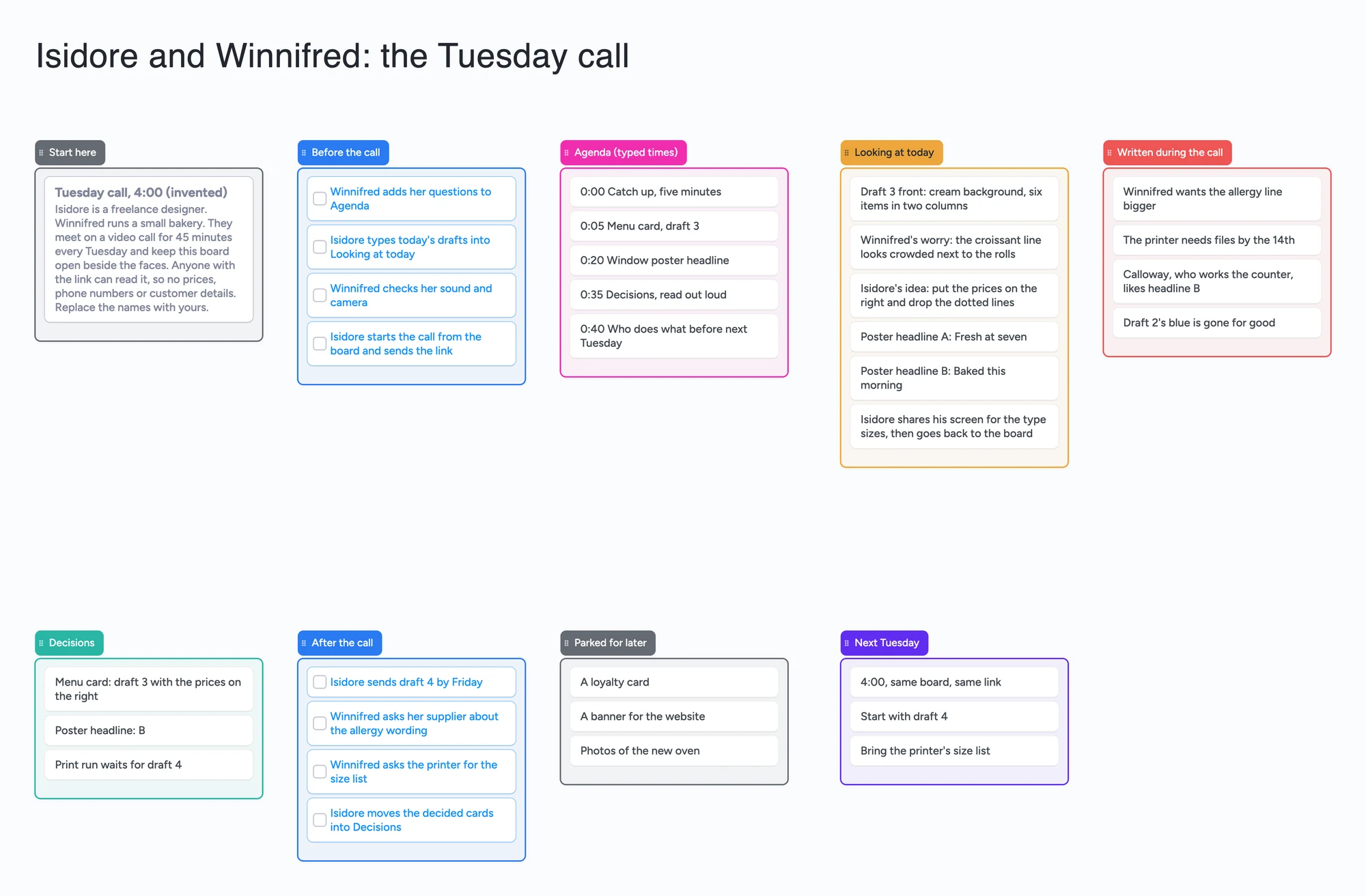
We make Instaboard, an online board with built-in video calls. This page is about one kind of call: the same two adults, the same hour, every week. It is filled in for two invented people, Isidore, a freelance designer, and Winnifred, who runs a small bakery, who meet for 45 minutes every Tuesday and keep one board open beside the faces. The board has nine lists: Start here, Before the call, Agenda (typed times), Looking at today, Written during the call, Decisions, After the call, Parked for later and Next Tuesday. It holds no prices, phone numbers or customer details, because the link shows every card to whoever holds it. It does not draw a diagram for you, record the call, send a reminder or keep a history of who changed what. If you only want a whiteboard inside a call you already have, the board still works beside it, and the table below says what Zoom and FaceTime already offer.
Opens in your browser. Anyone can view; a free sign-in lets you edit.
Updated
Before you start: who this is for and what stays off it
- Made for a call that repeats. Two adults, the same slot each week. The agenda is typed before the call, short notes go in during it, and the jobs wait on the board afterwards. A single one-off call needs less than this.
- Whoever holds the link can read every card. So the example holds no prices, phone numbers, addresses or customer details. Keep those in a private place.
- Not included: call recording, reminders, due-date alerts, auto-drawn diagrams. A tick doesn't say who made it or when, and anyone allowed to edit can un-tick it without a trace.
- On the free plan the example board takes 43 of your 150 free items: 33 cards, 9 lists and the title box (our count). Arrows and pen strokes aren't counted. To write, a person signs in free; someone who only reads can open the link signed out. Pro removes the item limit.
A 45-minute Tuesday call, minute by minute
Isidore and Winnifred use one board every week. Everything on it is invented. The lists run left to right along the top row, then along the second.
- Start here (1 card). Who the call is for, how long it runs and what stays off the board.
- Before the call (4 cards, tick boxes). Winnifred adds her questions, Isidore types the drafts into Looking at today, Winnifred checks her sound and camera, Isidore starts the call from the board and sends the link. Each card starts with the owner's first name.
- Agenda (typed times) (5 cards). Typed times: 0:00 catch up, 0:05 the menu card, 0:20 the window poster headline, 0:35 decisions read out loud, 0:40 who does what.
- Looking at today (6 cards). What is on screen and the worry or idea about it, one card each. One card says Isidore shares his screen for the type sizes and then goes back to the board.
- Written during the call (4 cards). Short facts that come up: the printer needs files by the 14th, Calloway at the counter likes headline B.
- Decisions (3 cards). Only what was agreed, read out loud at 0:35.
- After the call (4 cards, tick boxes). Who sends what by when, and moving the decided cards into Decisions.
- Parked for later (3 cards). Ideas that came up and don't belong in this call.
- Next Tuesday (3 cards). Same time, same link, where to start.
Nothing on it is joined by arrows; the left-to-right order carries the plan.
What to say out loud, what to type and what to leave off
A call and a board do different jobs. Our own rule of thumb, not a study:
- Say it: the thinking, the doubts, the "what if". A card can't carry tone.
- Type it, in one line: a decision, a date, a number and who owns the next step. These are what people forget.
- Leave it off: anything private. The link shows everything to whoever holds it, so no prices, no contact details and no customer information. A Pro plan adds invite-only boards.
- Read the Decisions list out loud before you hang up. It takes under a minute and is the one habit that keeps the notes honest.
Do Zoom and FaceTime already have a whiteboard?
Sometimes, and sometimes that is enough. Both rows below come from each company's own pages, read on November 27, 2026. Google Meet and Microsoft Teams have their own pages on this site.
| Call app | What its own pages say | Where it does better (our view) | Where this board does better (our view) |
|---|---|---|---|
| Zoom | Zoom's Whiteboard product page lists, for Whiteboard Basic (Free), three whiteboards that can be edited at once and sharing "publicly with anyone, no sign-in required". Its sharing help (KB0058153, updated 2026-03-24) says the "Anyone with the link can view this board" option makes a board available "to all users with a Zoom account, including users outside your organization", and that sharing with external users happens "when enabled by admin". Its time-limit help (KB0067966, updated 2025-10-29) says almost all meetings scheduled and hosted by Basic (free) users are limited to 40 minutes | A whiteboard inside a Zoom meeting, with templates, frames and export; meetings with many people | A board that stays at one link between calls; calls on the board run up to 60 minutes |
| FaceTime | Apple's Mac guide "Collaborate on projects during a FaceTime call on Mac" doesn't describe a whiteboard in FaceTime. It says that during a call you can open an item in an app that supports collaboration, such as Freeform, Keynote or Pages, click Collaborate, and recipients get an invitation in Messages; once they accept, participants see each other's changes in real time | Two people who both use Apple devices and already work in Freeform | A link that can be read in a browser |
Swipe the table sideways to see every column.
Zoom: product page, KB0058153 and KB0067966, read November 27, 2026 (the product page prints no date). FaceTime: Apple Support's Mac guide, read November 27, 2026; the page prints no date. Not affiliated with any of them.
Instaboard's own calls, for comparison: free calls run up to 60 minutes per call, with a warning 10 minutes before the end. Calls need a free sign-in, there is no recording, and Pro has no limit. Screen share is available on desktop and web only.
Where these win
If you are already in Zoom and want to sketch for ten minutes, use Zoom's whiteboard. If you are two Apple users on FaceTime, try Freeform. Use this board when the same two people want the agenda, the notes and the next steps to still be there next week.
Start the call from the board, or keep your call app
- Open the board and put your own call in it. Replace Isidore, Winnifred and the drafts with your people, topics and times, and delete what you don't need, because every card counts toward the 150 free items.
- Choose who can type. The Share setting on a new board reads "Anyone who joins can view". Switch it to "Anyone who joins can edit" if the other person should add their own questions; they sign in free the first time. Then open the link in a signed-out window to see what a reader sees.
- Call from the board, or keep Zoom or FaceTime. Calls on the board need a free sign-in for everyone. If you stay on another app, paste the board link into the invitation and keep it open in a second tab.
- Type the agenda before the call and tick the Before the call cards.
- During the call, one line a card. Move agreed cards into Decisions as they are said.
- After the call, tick the After the call cards as each job is done. Someone with edit rights can undo a tick and the board keeps no record of who did.
- Next week, reuse the same board. Un-tick last week's boxes by hand, or make a copy for a new run: a copy uses 1 of your 5 free boards and keeps the ticks.
What stays after the call ends
A call ends and the room is gone. The board is still at the same link, so Next Tuesday has a place to start. Two small habits keep it useful:
- Reset the tick lists by hand. No clear-all exists, and copies keep their ticks, so un-tick each box yourself.
- Move old decisions out, or delete them. A weekly board that is never pruned will reach 150 items, and the limits below show the arithmetic.
What the free plan means for a weekly call board
- Items. Every card, list and text box counts toward the 150 free items across your boards. The example takes 43; arrows and pen strokes are free. Our arithmetic: three copies are 129 items and a fourth passes 150 (172). Pro removes the item limit ($5 a month billed yearly, $59.99 a year, or $7.99 monthly).
- Privacy. Link readers see everything, so keep prices and customer details off. Invite-only boards need Pro.
- Reminders and history. No reminders or due-date alerts, and no record of who ticked or edited a card.
- Boards and pictures. 5 free boards, 3 pictures on each. The example has no pictures.
Start from the ready board
It opens in your browser in a few seconds, with nothing to install. Sign in for free when you want to save it and share it.
Questions
Can I have the call and the board in one place?
Yes. Start the call on the board, or keep your usual call app and open the board beside it. Calls on the board need a free sign-in for everyone.
Does FaceTime have a whiteboard?
Apple's Mac guide, read November 27, 2026, doesn't describe one. It says that during a FaceTime call you can open an item in an app that supports collaboration, such as Freeform, Keynote or Pages, and click Collaborate; recipients get an invitation in Messages.
How long can a free call on the board run?
Free calls run up to 60 minutes per call, with a warning 10 minutes before the end. Calls need a free sign-in, there is no recording, and Pro has no limit.
Can I share my screen on the call?
Screen share is available on desktop and web only.
Is the board private?
No. Whoever holds the link can see every card, and a new board's Share setting reads "Anyone who joins can view". Keep prices, contact details and customer information off it.
How many cards can a call board hold for free?
The free plan counts every card, list and text box toward 150 items across all your boards, and the example takes 43. Arrows and pen strokes are free. Three copies would be 129 items and a fourth would pass 150 (our arithmetic). Pro removes the item limit.
Sources
- Zoom: Whiteboard product page (read November 27, 2026; no date printed)
- Zoom: Sharing a whiteboard (KB0058153, updated 2026-03-24, read November 27, 2026)
- Zoom: Understanding time limits for Zoom Meetings (KB0067966, updated 2025-10-29, read November 27, 2026)
- Apple Support: Collaborate on projects during a FaceTime call on Mac (read November 27, 2026; no date printed)