For college students keeping their own assignments in one place
An assignment tracker for college, one list per course
We make Instaboard, an online board. Read the limits first: this board sends no reminders or due-date alerts, does not sync with Canvas or any school system, and holds no grades. If you want alerts or an automatic import from your school, an app such as Coursicle or MyStudyLife, or a spreadsheet, does that better. What the board gives you is the layout already filled in for one invented student, Aldous: a list for each course with a card and a due date for every assignment, a calendar list for the exams and big deadlines, a list of replies you are waiting on, a list of syllabus dates still to enter and a Friday check. Copy it and type your own. It is written for college students.
Opens in your browser. Anyone can view; a free sign-in lets you edit.
Updated
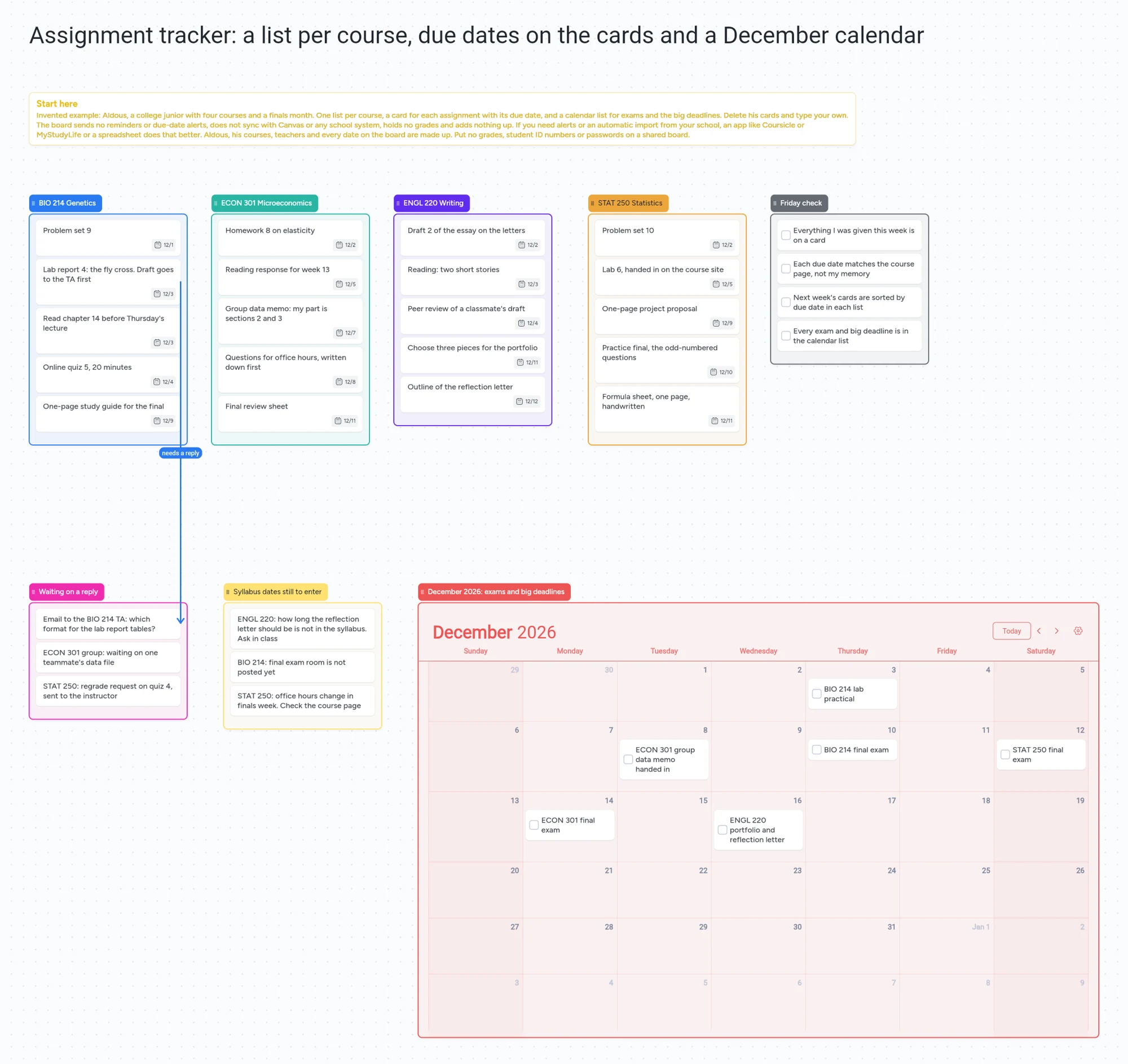
Before you copy it: what this board does and doesn't do
- No reminders or due-date alerts. A card can carry a due date (a whole day, no time of day), and the calendar list puts cards on their days, but nothing warns you. If you need a nudge, put the dates in a calendar app that sends one.
- No Canvas or LMS sync. You type each assignment yourself, from the syllabus or the course page. Coursicle's and MyStudyLife's own pages describe syncing and reminders; a spreadsheet sorts and filters in one view.
- What it is: one screen where each course is a list, each assignment is a card with its date, and the exams sit on a calendar. The example takes 46 of the 150 items a free account allows.
- Keep off it: grades, student ID numbers and passwords. Whoever holds the link can read the board, so treat it like a page you would show a classmate.
- On the free plan: 5 boards, 150 items and 3 pictures per board, and copying this one uses up one of the 5 boards. You need a free sign-in before you can type on it. A fresh board is read-only for people who only have the link.
What students in two threads say they use
We read two threads in an archived copy, comments with text. Every reply is one account's view, not research, and the threads are from 2024 and 2025.
- r/college "How do you keep track of deadlines for assignments and exams? Do apps help, or do you rely on other methods?" (OP u/StepWise2424, January 23, 2025, UTC; Reddit shows 33 comments; our archived copy has 34, 1 removed, 33 with text, which include the OP's 5 replies and one app maker, u/Obvious_Focus_2706 with Guru Countdown). u/Clumsy_Chica keeps a weekly paper planner and at the start of the term puts in all the deadlines from the syllabi; when a date changes, "I just cross it out and pop in the corrected date". u/psychoticpyromaniac puts their life on Google Calendar and checks each syllabus at the start of the term for assignments that are not on the LMS. u/chaxew_monstoer says the Canvas calendar, checked once a day, keeps them on track, and u/Gromy_1022 writes "Most D2L/LSM/Canvas have a setting where you can set it to remind you of due dates for tests and assignments". u/fhockey4life used a Google Sheet sorted by due date with a colour per class and deleted rows as they were done. u/JazzlikeHarpsichord uses Notion and Todoist and likes the notifications for upcoming deadlines.
- r/UMD "What's the best app for keeping track of assignments and due dates?" (OP u/Lost_Interaction9620, September 23, 2024, UTC; Reddit shows 44 comments; our archived copy has 43 with text, 0 removed). u/maple242 uses Google Sheets and checks assignments off "straight off the syllabus". u/hainic0 uses Todoist with a project per class. u/Hot-Pineapple-2437 enters all due dates from the syllabus into Microsoft To Do and plans the readings at the start of each week. u/Kolawa uses a notebook with a column for tasks and a column for events. The OP answers one reply with "it's just so much prep" and wishes an app could scan a syllabus into a calendar.
Seven accounts in the second thread, all posting between September 2025 and June 2026, link or name a tool they say they made or push (sylcampus, Due Gooder, UpAhead, caltodo, Courselink, syllabye). We count those as promotion and cite none of them. One commenter in that thread says it may be a set-up for promoting a startup.
Two things come up again and again: typing the dates in at the start of the term, and a changed date that has to be fixed in one more place. The board keeps both on a card you can edit. It does not do the prep for you, and it does not remind you.
Two apps and a sheet: what their own pages say
Read on November 27, 2026 as page text. We did not open the apps, so these are the pages' own claims, in our wording.
| Tool | What its page says | Better for |
|---|---|---|
| Coursicle, blog page "Best Free Assignment Tracker" (the page prints September 29, 2025) | Syncs Canvas, Classroom, Brightspace, Blackboard and Moodle, sends daily reminders of deadlines, and takes custom tasks for things a professor announces in class | Automatic import and reminders, which we do not do |
| MyStudyLife, home page | A free student planner with homework, exams and class schedule in one calendar, reminders before every class, deadline and exam, on web, iPhone and Android; its page also says it syncs Canvas and Blackboard timetables, and calls MSL+ "an optional upgrade for personalization and extras" | A timetable, reminders, exam planning and school sync |
| A spreadsheet, as the students above use one | u/fhockey4life and u/maple242 sort or tick off rows in Google Sheets; u/katiethetriceratops keeps an Excel calendar of all due dates | Sorting every assignment by date in one view, which our lists do one list at a time |
| The school's own LMS calendar | u/chaxew_monstoer says the Canvas calendar has links to each assignment; u/Gromy_1022 says most D2L, LSM and Canvas setups have a reminder setting (one person's view) | Anything your school already posts, if your professors use it |
Swipe the table sideways to see every column.
Pages read November 27, 2026; the apps and sheets themselves were not opened. Student lines are single accounts from the two threads above.
If your problem is a lot of assignments that must sort and nag you, start with one of those. If it is a layout where each course has its own list and the exams sit on a calendar beside it, the board is that layout.
Aldous's board, list by list
Aldous and everything on his board are invented: the courses, the teachers, the assignments and every date. None of it is real. It is a junior's December, with four courses and a finals week.
- One list per course. BIO 214 Genetics, ECON 301 Microeconomics, ENGL 220 Writing and STAT 250 Statistics each hold five cards. A card is one assignment with its due date; the date shows on the card as a small chip.
- Friday check. Four tick boxes: everything given this week is on a card, each due date matches the course page and not memory, next week's cards are sorted by due date in each list, and every exam and big deadline is in the calendar list. A tick does not say who or when, so untick them by hand each Friday.
- Waiting on a reply. Three cards: an email to a TA about the lab report tables, a teammate's data file and a regrade request. An arrow with the caption "needs a reply" runs from the lab report card to the first one.
- Syllabus dates still to enter. Three cards for things the syllabus left open: a letter length, a final exam room, changed office hours. It is where "ask in class" lives until someone answers.
- December 2026: exams and big deadlines. A calendar list that puts six cards on their days: a lab practical, a group memo handed in, three finals and a portfolio. Each of the six has its own tick box. The assignments themselves stay in the course lists.
When a date changes
u/Clumsy_Chica crosses out the old date and writes the new one. On the board you open the card and change its date. Two big deadlines on Aldous's board have a card in a course list and a second card in the calendar list: the ECON group memo (the working card, "my part is sections 2 and 3", is due 12/7; the calendar card, handed in, is on 12/8) and the ENGL portfolio ("choose three pieces" is due 12/11; the portfolio and reflection letter sit on 12/16 in the calendar). The two cards carry different dates on purpose, one for the step and one for the hand-in.
The board does not link the pair, so a moved hand-in date means changing the calendar card yourself, and a moved step means changing the course card. The Friday check is the habit that catches it: compare each date with the course page, not with your memory, and fix whichever card is wrong. Nothing tells you a date moved; that stays your job.
Setting it up for a new term
- Open the board and sign in free the first time you want to type. Delete Aldous's cards, keep the lists and rename each course list.
- Go through each syllabus once. Put every assignment with a date on a card in its course list and put the exams on the calendar list. Anything the syllabus leaves open goes in Syllabus dates still to enter.
- Set each card's due date on the card. A date is a whole day, with no time.
- Sort a list by due date when you want the next thing on top. Sorting covers one list, so there is no single view of all four courses.
- On Fridays, go through the four ticks, fix any date that moved, then untick them for the next week.
- If a study partner should type too, change the board's sharing from view to edit. They sign in with a free account the first time they write.
What stays off a board you share
Anyone you give the link to can read the board, and these are our own rules for this page; your school's rules come first.
- No grades and no feedback text. Aldous's board holds assignment names and dates only.
- No student ID numbers or logins.
- No other students' details. A teammate appears as "a teammate's data file", not by name.
Four courses or six: what that does to the 150
On the free plan every card and every list counts toward 150 items, summed over all your boards, and the title text box counts as one. Arrows, sections and pen strokes are not counted. Our arithmetic from the example:
- As built: 8 lists + 37 cards (one is the Start here card) + 1 title = 46 items.
- Five courses: each extra course adds 1 list and 5 cards, so 52.
- Six courses: 58.
- Keeping every finished card: 4 course lists with 15 assignments each, left on the board all term, is 4 + 60, plus the other 4 lists and 17 cards, plus the title: 86.
- Copying it again for another term: each copy is another 46, so three copies come to 138 and a fourth reaches 184, past the 150.
What stays with the app and the sheet
- No reminders or due-date alerts. It does not know an assignment is due tomorrow.
- No Canvas, Blackboard or school sync. Every card is typed by you.
- No scanning a syllabus. The board does not read, summarise or import one.
- No grades and no totals. Nothing adds up scores or tells you where you stand.
- Sorting is per list. You cannot see all four courses by due date in one view.
- Ticks carry no name or time, and a copy brings its ticks along, so clear them before you reuse the board.
- Sharing starts read-only. Giving someone the link lets them look; typing needs you to change the setting.
- One copy, one of your 5 boards, and the example uses none of the 3 pictures a board can hold.
Start from the ready board
It opens in your browser in a few seconds, with nothing to install. Sign in for free when you want to save it and share it.
Questions
What should an assignment tracker for college include?
In the two threads we read, several students put each assignment with its due date somewhere they check every day, and several start by copying the dates from each syllabus at the start of the term. Some add the exams on their own calendar and keep a list for things the syllabus leaves open. This board has a list per course, a due date on each card, a calendar list for exams and a list for syllabus dates still to enter.
Does the board remind me when something is due?
No. It has no reminders or due-date alerts. A card can carry a due date and the calendar list shows it on its day, but nothing warns you, so put the dates in a calendar app that does.
Does it sync with Canvas?
No. It does not sync with Canvas or any other school system, so you type each assignment yourself. Coursicle's own page says it syncs Canvas, Blackboard and other systems, and MyStudyLife's says it syncs Canvas and Blackboard timetables; use an app like that if automatic import matters more than layout.
Is a spreadsheet or a board better for assignments?
A spreadsheet is better for sorting every assignment by date in one view. A board is better for seeing each course as its own list, the exams on a calendar and the replies you are waiting on side by side. Several students in the threads use a spreadsheet and several use a paper planner or Google Calendar; use two if you like.
Can a study partner write on it?
Yes. Send them the link and they can read it at once. For them to type, switch the board's sharing to edit, and they sign in with a free account first. Keep grades and logins off it either way.
Is Instaboard free?
Yes. The free plan includes 5 boards, 150 cards and items across your account (pen strokes, arrows and sections don't count), 3 images and 1 file per board, unlimited collaborators and video calls up to an hour. Pro is $5 a month billed yearly ($59.99 a year), or $7.99 monthly, and the people you invite join free.
Sources
- r/college: How do you keep track of deadlines for assignments and exams? Do apps help, or do you rely on other methods? (OP u/StepWise2424, January 23, 2025; replies are single accounts; Reddit shows 33 comments, archived copy 34 with 1 removed, 33 with text; post dated UTC; November 27, 2026)
- r/UMD: What's the best app for keeping track of assignments and due dates? (OP u/Lost_Interaction9620, September 23, 2024; replies are single accounts; Reddit shows 44 comments, archived copy 43 with text, 0 removed, 7 accounts promoting a tool not cited; post dated UTC; November 27, 2026)
- Coursicle: Best Free Assignment Tracker (the page prints September 29, 2025; read November 27, 2026; the app not opened)
- MyStudyLife: home page (read November 27, 2026 as page text; the app not opened)