For a small team that looks back after each sprint or project
Run a Start Stop Continue retro on a shared board
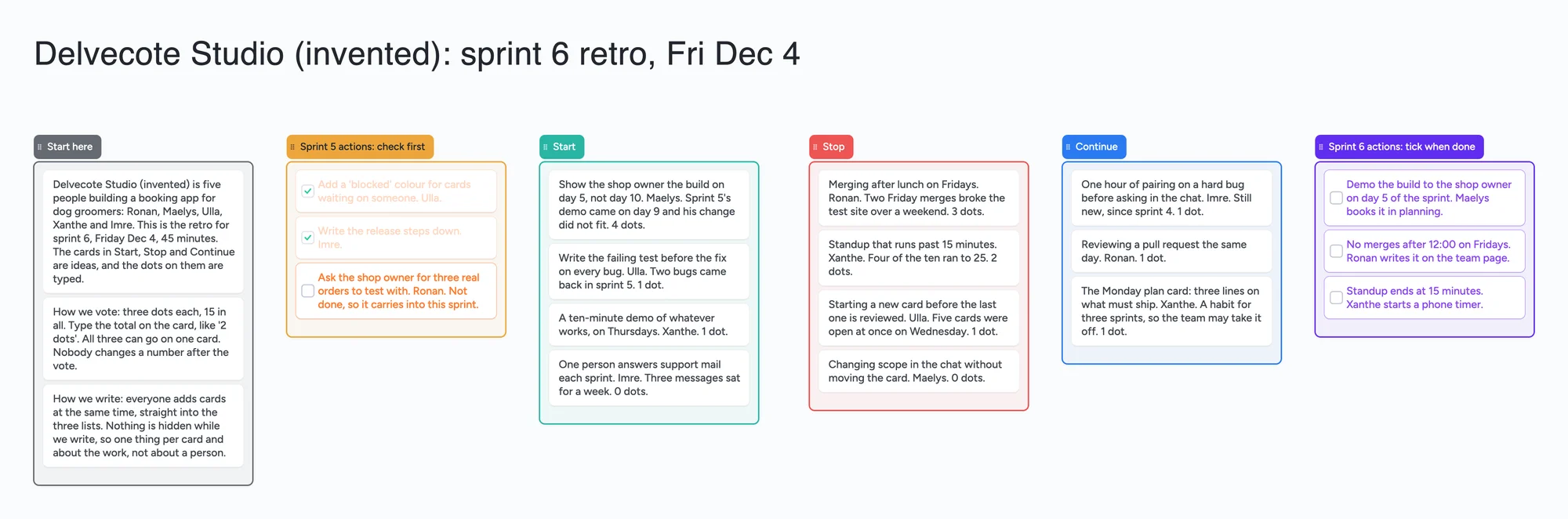
Instaboard is our product, a shared online board. This page hands you a Start Stop Continue retro that is already laid out and filled in for an invented five-person team: Delvecote Studio builds a booking app for dog groomers and is closing its sixth sprint. Three idea lists hold eleven cards, a fourth list holds the actions it set last sprint, and a fifth holds the three it sets now. Read the limits first: everyone needs a free sign-in to write, nothing can be written in secret, and the dots are numbers someone types. Retro tools do those things for you, and a section below sets four of them beside this board.
Opens in your browser. Anyone can view; a free sign-in lets you edit.
Updated
Read this before you run a retro here
- Who can write: anyone who opens the link can read the board. To add a card they sign in free. The board doesn't show who wrote a card.
- What it can't do: hide cards until everyone has finished, count votes, time each list or write up the meeting. Cards show on every screen as they are typed, and a dot is the text '2 dots' on a card that anyone with edit access can change.
- One retro, one board: a retro is a new set of lists each sprint. Either copy the board each time (each copy uses one of your five free boards) or keep one board and add four lists a sprint. The room section works both out.
- Leave off: customer names, money, and any card that judges a person instead of the way the team works. Anyone holding the link can see the board.
- When to use something else: a retro tool, when you want hidden writing, a timer everyone can see, counted votes or a summary. A section below reads four of them.
What this board can't hide, count or keep for you
A retro rests on people saying a true thing about the last sprint. Here is what the board gives them and what it leaves out, before the method.
- Writing in secret. Three of the four pages we read say to let people write privately first, so nobody copies the loudest idea; Mountain Goat's default is to yell ideas out. This board has no hidden mode: a card is on every screen within seconds. The team writes in the open, or writes elsewhere and pastes.
- Writing as a guest. Writing needs a free sign-in. A reader who isn't signed in can look at the board and change nothing.
- Counting votes. The three dots each are typed. Nothing checks that anyone used only three, and any person with edit access can retype a number.
- Time. The 45 minutes is only text on the first card. The app does have a countdown timer widget, but we put none on this board and didn't test one for this page, so nothing here times a discussion.
- A summary. Nobody is sent a write-up and no past retro is kept for you except the board itself.
- Who ticked an action. Anyone who can edit can tick or untick a box, and nothing records who did or when. There are no reminders or due-date alerts either.
If your team needs any of those, go to the section on retro tools. If it needs three lists, a place to type last sprint's actions and a place to type the new ones, read on.
Three lists, and where four pages disagree
We read four pages that describe the exercise on November 27, 2026: Mountain Goat Software, TeamRetro, Retrium and Parabol. Only Mountain Goat's prints a date (Last updated June 24th, 2024). They agree on the three lists: Start for things the team isn't doing and should, Stop for things that waste time or get in the way, Continue for what to keep. They disagree on the rest, and the table puts what each page says beside what Delvecote does.
| Page | How people give ideas | Votes | Time | Where it says to begin |
|---|---|---|---|---|
| Mountain Goat Software | Yell them out in any order, or go round the room one item each, sometimes only Stop items | One vote each, or any multi-voting such as three votes each; pick no more than three items | No minutes stated | No order given |
| TeamRetro | Private space to add ideas, then the team groups them | Dot voting named, no number | No minutes stated; cap actions at two or three | Start with Continue |
| Retrium | Private ideas on sticky notes, then grouping | Dot voting 'if there are a lot of ideas', no number | 30 to 60 minutes for the meeting; 20 to 40 for discussion, or 5 to 10 a topic | No order given |
| Parabol | Silent reflections that others can't see until the reflect stage ends | Voting, no number | A timer; run it a few days to a week after the sprint | No order given |
| Delvecote (example) | Everyone types straight into the lists | Three each, 15 in all | 45 minutes | Last sprint's actions, then Start, Stop, Continue |
Swipe the table sideways to see every column.
Our reading: all four describe the same lists, and no two agree on how long to talk or how to vote. The example's three dots follow the three-votes-each example in Mountain Goat's page; the 45 minutes is the team's choice. Mountain Goat's page is written in the first person; its sidebar names Mike Cohn.
Delvecote's sixth sprint, list by list
Everything on the board is invented: the studio, the five people and the sprint. The retro is on Friday, December 4.
- Start here (3 cards). Who the team is, the way to vote (three dots each, typed as the total on the card) and the way to write (everyone at once, one thing a card, about the work and not about a person).
- Sprint 5 actions: check first (3 cards). Two ticked, one open: a 'blocked' card colour (Ulla), written release steps (Imre) and three real orders from the shop owner to test with (Ronan, not done, so it carries into this sprint).
- Start (4 cards). Show the shop owner the build on day 5, not day 10 (Maelys, 4 dots), write the failing test before the fix (Ulla, 1), a Thursday demo of whatever works (Xanthe, 1) and one person on support mail each sprint (Imre, 0). Six dots in all.
- Stop (4 cards). Merging after lunch on Fridays (Ronan, 3 dots), a standup that runs past 15 minutes (Xanthe, 2), starting a card before the last is reviewed (Ulla, 1) and changing scope in the chat without moving the card (Maelys, 0). Six dots.
- Continue (3 cards). An hour of pairing before asking in the chat (Imre, 1), same-day pull request review (Ronan, 1) and the Monday plan card (Xanthe, 1). Three dots.
- Sprint 6 actions: tick when done (3 cards). Demo on day 5 (Maelys books it in planning), no merges after noon on Fridays (Ronan writes it on the team page) and a 15-minute standup (Xanthe uses a phone timer). One name on each, none ticked.
Our arithmetic: 6 + 6 + 3 = 15 dots, which is three each for five people. The three actions follow the top three vote-getters, Start's 4 dots, Stop's 3 and Stop's 2. Mountain Goat's page says to pick no more than three, and TeamRetro's says to cap actions at two or three; both are pages we read, not a rule of the board.
Checking last sprint before the new lists
TeamRetro's page says to check the last retro's actions at the start of the next one. Mountain Goat's brings last time's list to the next retro too, taped to the wall 'without any fanfare or discussion', just there if the team wants it. On the board the last actions are the second list, kept as tick cards.
- Before anyone writes, read the tick cards out. Delvecote has two ticked and one open.
- An open card has three fates: it carries into the new actions (as the shop-owner orders do here), it is dropped with a line on why, or it goes into Stop if it is the habit that keeps failing. The pages we read don't pick one for you.
- The Continue list needs pruning: Mountain Goat's page says an item can stay for a few sprints, and is removed once it is a habit, 'otherwise, the continue would become tremendously long'. Delvecote's Monday plan card has run three sprints, so its card says the team may take it off.
- Parabol's page describes where repeating it leads: "eventually you'll have a dense “continue” column with relatively light “start” and “stop” columns". The example's Continue has 3 cards against 4 and 4, so it isn't there yet.
Writing in the open: three ways to cope
Because every card shows as it is typed, the first person's idea can steer the rest. Our suggestions, not a source's:
- Count down, then type. Everyone writes on paper or in a private note for three or four minutes, and then types. Retrium's page suggests private ideation for the same reason.
- Take Stop first, in the open. Mountain Goat's page says it sometimes asks for nothing but Stop items. The team is already talking about the sprint, and the hardest list is done before voices drop.
- Do the sensitive part elsewhere. If a card is about how one person works, it doesn't belong on a board shared by link. Take it to a one-to-one and leave the retro for how the team works, which is also what TeamRetro's page says to talk about.
How much room a retro takes
The free plan counts items across all your boards, up to 150. Each list counts, each card counts and so does the title text box; strokes, arrows and sections don't.
- As built: 6 lists, 20 cards and the title make 27, leaving 123.
- A fresh copy each sprint: five copies come to 135 items and fit under 150, but each copy uses one of your five free boards, so a sixth sprint needs a board you don't have.
- One board, new lists each sprint: each extra sprint adds 4 lists (Start, Stop, Continue and the new actions) and about 14 cards, which is 18 items. 27 + 6 x 18 = 135 after the seventh sprint, and the eighth reaches 153 (our arithmetic, if every card stays).
- Pictures: three a board; the example has none.
- Not private: anyone given the link and edit access can change a card. Invite-only boards belong to Pro.
Pro removes the item limit. Its price is $5 a month on a yearly bill ($59.99), or $7.99 month to month.
When a retro tool is the better pick
These are the pages as we read them on November 27, 2026. 'Not listed' means absent from that page, which proves nothing about the product. We don't rank them, and Instaboard has no tie to any of them.
| Page | What it says | What the tool adds | When this board is enough |
|---|---|---|---|
| TeamRetro's template page | Titled as a free template. Says the tool gives everyone a private space to add ideas, then groups, votes and sets actions; try it for 30 days with no credit card. The page lists no plan prices (read November 27, 2026). | Private ideas, grouping, dot voting, tracked actions | Your team already keeps its plans on a board and wants the retro beside them |
| Retrium's page | A retrospective technique chosen from its toolkit; private ideation, grouping, optional dot voting, a timebox. Try all templates for 30 days. The page lists no prices (read November 27, 2026). | Guided steps, a timebox, an action plan | A short retro that doesn't need a facilitator tool |
| Parabol's template page | Reflections hidden from others until the stage ends, a timer, voting, async or live, and a summary sent at the end. The page lists no plan prices (read November 27, 2026). | Hidden writing, a timer, a summary, running it async | Nothing to set up beyond a link and a free sign-in |
| EasyRetro's pricing page | Free $0 a month: 1 public board a month, 1 survey a board, participants unlimited; AI summary, grouping and templates listed as No. Team US$21 a month billed annually or US$25 a month without annual billing: 5 public boards a month, those features Yes. | A board a month on its free plan, grouping on paid plans | Your free plan keeps up to 5 boards at once, not one new board a month |
| A whiteboard or sticky notes in a room | Nothing to read | Nothing to sign in to | A team that isn't in one place |
Swipe the table sideways to see every column.
From each page as read November 27, 2026. Vendor content.
Running your first retro on this board
- Open the board and keep the six lists. Swap Delvecote's cards for your team's, so the board holds one team's sprint and no one else's.
- Rewrite the Start here cards. Say who is on the team, the length of the meeting, how many dots each person gets and whether all can go on one card.
- Type last sprint's actions into the second list as tick cards, one name each.
- Share it for editing. In Share, choose 'Anyone who joins can edit'. Boards start view-only, so each teammate signs in once to write. Your copy uses up one of the five free boards.
- Start with the actions, read the ticks out, then everyone adds cards to Start, Stop and Continue.
- Vote out loud or by typing, then move to the top few. Write each new action as a tick card with one name.
- Next sprint, copy the board or add four lists, and put these actions in the second list.
Start from the ready board
It opens in your browser in a few seconds, with nothing to install. Sign in for free when you want to save it and share it.
Questions
What is a Start Stop Continue retrospective?
A meeting after a sprint or project with three lists: what to start doing, what to stop and what to keep. Every page we read describes the same three lists. They differ on how long it runs, how to vote and whether people write in private first.
Can people write in private first on this board?
No. Cards show on every screen as they are typed, and the board has no way to hide them until everyone is done. Parabol's page describes reflections hidden until the stage ends, and TeamRetro's and Retrium's describe private ideation, so use one of those if that matters to your team. On this board, write on paper first and then type.
How many votes should each person get?
The pages differ. Mountain Goat's says one vote each or any multi-voting, with three votes each as its example, and no more than three items chosen; TeamRetro's, Retrium's and Parabol's name voting without a number. The example gives three dots each, 15 in all for five people. Fix the number before the first card and don't change it after the vote.
What do I do with the Continue list over time?
Mountain Goat's page says items come off the Continue list once they are habits, because otherwise it would become tremendously long. Parabol's page expects a dense Continue and light Start and Stop after many retros. The example's Monday plan card is the kind of item the first page means.
Should we take Stop first?
The pages differ. TeamRetro's says some facilitators lead with Stop to clear away what isn't working, and others lead with Start to keep the tone forward-looking, and that either way works. Mountain Goat's sometimes asks for nothing but Stop items. TeamRetro's tips also say to start with the Continue column so the team names what is working first. Pick one order before the first card and write it on the Start here card.
What does one retro cost on the free plan?
27 items: 6 lists, 20 cards and the title. A copy also uses one of your five free boards, and the board limit bites before the item limit does. Other boards of yours count toward the 150 as well. Pro removes the item limit.
Sources
- Mountain Goat Software: A Simple Way to Run a Sprint Retrospective (prints 'Last updated June 24th, 2024'; written in the first person; read in full in a browser November 27, 2026; vendor content)
- TeamRetro: Start Stop Continue Retrospective (no page date printed; read in full November 27, 2026; vendor content)
- Retrium: Start Stop Continue Retrospective (no page date printed; read in full November 27, 2026; vendor content)
- Parabol: Start Stop Continue Retrospective (no page date printed; read in full November 27, 2026; vendor content)
- EasyRetro: pricing (no page date printed; read November 27, 2026; vendor content)