For college students and recent graduates applying for internships
An internship application tracker you can copy and edit as a board
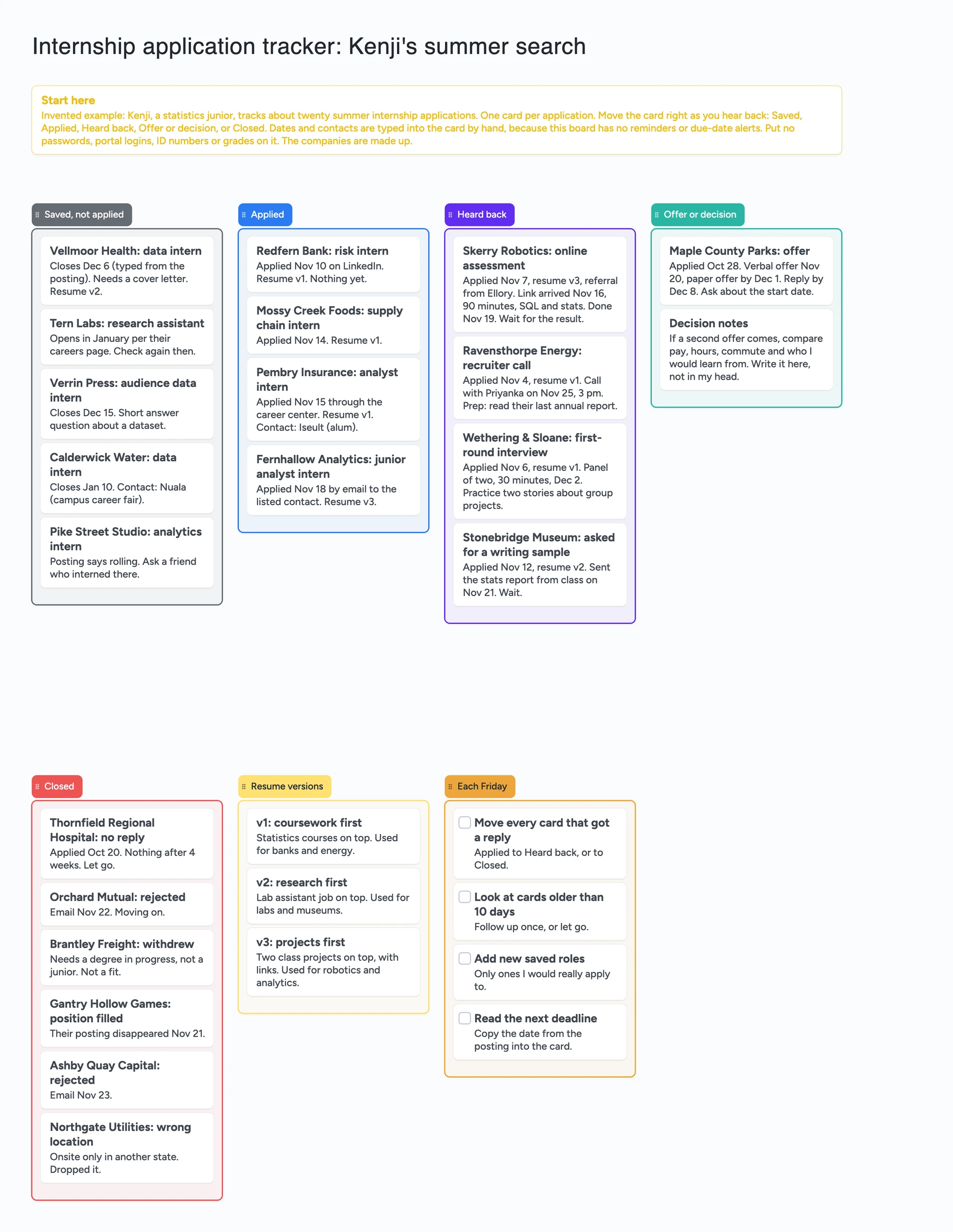
We make Instaboard, an online board. This page gives you an internship tracker already laid out on it and filled in for one invented student, Kenji, a statistics junior with about twenty applications in flight. Each application is one card. The cards sit in lists that follow the search: saved but not applied, applied, heard back, offer or decision, and closed. Two more lists hold Kenji's three resume versions and a Friday check. Open it, replace Kenji's cards with yours, and move a card to the next list when you hear back. It is a place to see the whole search at once, with dates and contacts typed into each card. It does not remind you of anything, read your email, fill in applications, and it holds no passwords or logins. The companies on it are made up.
Opens in your browser. Anyone can view; a free sign-in lets you edit.
Updated
Read this first: what the board does and doesn't do
- What it is: a card per application, in lists that match where each one stands. You see saved, applied, heard-back and closed roles on one screen, and whoever else has the link, a friend or a career advisor, sees the same thing. The example uses 37 of your 150 free items.
- What it isn't: no reminders, no email scan, no browser button that saves a posting, no autofill and no counts or charts. Deadlines and follow-up dates are text you type into a card. The four Friday cards are tick boxes you read and tick yourself.
- Written for adults: this is for college students and graduates. If you are under 18, check with a parent or your school before you put an account on any site.
- Keep logins off it: a free board is shared by link. Put no portal passwords, ID numbers, grades or transcripts on it, and think before you add a contact's personal details.
- Free plan: 5 boards, 150 items, 3 pictures per board. Copying the board takes 1 of your 5 boards. Writing on it needs a free sign-in. New boards start with "Anyone who joins can view".
Kenji's search, list by list
Kenji is a statistics junior looking for a summer internship. Every company on the board is invented, and so are the dates. Read it left to right, top row then bottom row.
- Saved, not applied. Five roles Kenji might apply to. Each card carries the one fact that matters before applying: a closing date copied from the posting, a note that the role opens in January, or a contact met at a career fair.
- Applied. Four cards. Each says the date applied and which resume version went in, and most say where (LinkedIn, the career center, an email to a listed contact) or who referred you.
- Heard back. Four cards that have moved on: an online assessment, a recruiter call, a first-round interview and a request for a writing sample. The card keeps the application date and resume version and adds what happens next and what to prepare.
- Offer or decision. One verbal offer with the reply-by date typed in, and a Decision notes card for comparing offers in writing if a second one comes.
- Closed. Six cards that ended: no reply after four weeks, two rejections, a posting that disappeared, a role that wanted a different year of study, and one onsite in the wrong state. Closed cards stay on the board so Kenji does not apply to the same place twice.
- Resume versions. Three cards, v1 (coursework first), v2 (research first) and v3 (projects first), each with where it was used. This is how Kenji later sees which version led to replies.
- Each Friday. Four tick-box cards: move every card that got a reply, look at cards older than 10 days, add new saved roles and read the next deadline.
Nothing on the board is dated except what Kenji typed. The lists are not a calendar, and a card does not move itself.
Do you need to track every application?
Not everyone does, and the people who say so are worth hearing first. From r/internships, "Do you track your applications, or just apply and hope?" (OP u/External_Tea_7476, August 28, 2025; Reddit shows 16 comments and we read the 14 it still displays, 2 removed, in a browser on November 27, 2026; each reply is one person's view). The OP asks how people keep track and whether they would use a tool for companies, contacts and reflections.
- u/Appropriate-Tutor587 does not track at all: application portals built on Workday already show active and inactive jobs, and they just wait for a decline email or a recruiter.
- u/sohfiyah starts tracking only once an application gets past the automated screening to an online assessment or an interview, and puts it in a Notion table. They also list companies that will open roles soon, to check back. They tailor their resume to role types, not to each posting, so they do not track resume versions.
- u/dog-jl2008 tracks only the applications that need a cover letter, because the cover letter names the company, and has still had a rejection from a place they forgot they applied to.
- u/kamaelxiii and u/CSinNUS each point to a tracker site they built; u/Motor-Efficiency-869 names one that scans your email. Those are people naming their own or a favourite tool, not evidence about ours.
A second thread, r/internships "Simple yet effective internship & job application tracker" (OP u/TangyGG, December 10, 2023; Reddit shows 27 comments and we read the 23 with text, 2 deleted, in a browser November 27, 2026), is a student sharing a Google Sheets tracker; almost every reply is a thank-you. One reply, from u/nataleeen, says they used it for a job search and changed the columns to add job location and benefits, and that it was a good starting point for someone who was overwhelmed trying to build one. The OP also explained that they had accidentally allowed edits from people who had the sheet's link and had then updated the permissions; that is why the Start here card says to keep logins off a shared board.
What we take from this: you do not have to log every click. The board's Saved list is for roles that open later, the Heard back list is for the ones worth following, and Closed keeps the list of places you have already tried. If you only track after an interview, put only those cards on it.
What goes on a card, and what to leave off
JobCopilot's internship tracker spreadsheet page (dated February 8, 2026; read November 27, 2026; a company that sells a job-search tool, so its advice is one vendor's view) lists what it says is worth tracking: application date, company name, role title, status, resume version, recruiter or contact name and follow-up date, with source, cover letter and notes as optional extras. It suggests keeping status simple (applied, response received, interview scheduled, rejected, offer), reviewing weekly rather than daily and not deleting rejected applications because they help later pattern spotting. Kenji's cards follow that, with two changes: the list a card sits in is the status, and the rest goes in the card's text.
- Title: company and role, as the posting wrote it, so two similar roles do not blur.
- First line of the body: the date applied and where.
- Resume version: v1, v2 or v3, matching the Resume versions list.
- A contact: a first name and how you met, only if you want to follow up.
- What happens next: the one next step and its date, in words. The board will not warn you when the date passes.
- Leave off: passwords, portal logins, ID numbers, salary figures you were told in confidence and any private detail about another person.
JobCopilot's page also lists problems with spreadsheet trackers, among them manual updates and no reminder when a follow-up date passes. A board has both of those too, and the section on what a board can't do says so.
Make it yours: swap Kenji's cards for your own
- Open the board and sign in free when it asks you to write. Delete Kenji's cards and keep the lists you want.
- Add your roles to Saved first, with the closing date copied from each posting into the card.
- When you apply, move the card to Applied and write the date, where you applied and which resume version.
- When you hear back, move the card to Heard back and write the next step and its date. If the answer is no, move it to Closed.
- Keep your resume versions list short: v1, v2, v3 is enough, and it stays useful later when you want to see which one got replies.
- Each Friday, go down the four tick-box cards and tick them. Untick them the next week.
- To share it, leave Share on view for a friend or advisor who should only read, or set it to "Anyone who joins can edit" if they should write. Each person who writes signs in free.
How many applications fit in 150 items?
Each card and each list is 1 of your 150 free items, across all your boards. The title text box counts too. Arrows, sections and pen strokes don't. Our arithmetic from the example:
- As built: 7 lists + 29 cards + 1 title = 37 items.
- Of those, 20 are applications (5 saved, 4 applied, 4 heard back, 1 offer, 6 closed). The other 17 are fixed: 7 lists, the title, the Start here card, Decision notes, 3 resume versions and 4 Friday cards.
- Room for applications: 150 - 17 = 133, if nothing else is on your account.
- A big search: Teal's own comparison post (reviewed October 14, 2026; a vendor's view) describes a routine of about 10 jobs saved and 5 applications a week; over 8 weeks that is about 80 saved jobs. On this board, 80 cards + 17 = 97, which fits.
- An extreme search: JobCopilot's page cites one well-publicized case of a student who submitted over 450 internship applications (we did not open that case). 450 + 17 = 467, far over 150. At that scale a spreadsheet or a dedicated tracker is the better tool.
- Two searches: a second board for a different kind of role is another 37, and a copy takes 1 of your 5 boards. Both boards' items count toward the same 150.
- Past 150: Pro removes the item limit.
Where other trackers do this better
Read on November 27, 2026; plans and pages change, so check the page. A date is printed only where the page shows one. Teal's row comes from Teal's own post, so it is Teal's claim.
| Tool | What the page says | Better for |
|---|---|---|
| Huntr (pricing page, no date) | Free plan: job tracker up to 100 jobs, Chrome Job Clipper, map view, unlimited contact management and application autofills, up to 100 document uploads. Pro lists unlimited job tracking and AI resume and cover letter features, priced on the page at $40 a month, $90 every 3 months or $160 every 6 months | Saving postings from the web, autofill and a contacts list in one place, up to 100 jobs without paying |
| Simplify (job application tracker page, no date) | Page calls its tracker free and says the company plans to keep it that way. Describes jobs saved automatically when you apply with its extension, status updates, follow-up emails to recruiters, notes and contacts, insights, and importing a spreadsheet of applications you already made | Not typing every application by hand; analytics; importing an existing spreadsheet |
| Teal (own comparison post, reviewed October 14, 2026) | Says its free plan tracks unlimited jobs and keeps a resume version, contacts and a follow-up date with each one; a sortable table you can group by stage; a Chrome extension that saves jobs from any webpage | A follow-up date on every job, and a large search with no cap on tracked jobs, as the vendor describes it |
| A Google Sheets or Excel tracker (JobCopilot's template; Babson's career center spreadsheet, page shows no date) | JobCopilot offers a free Google Sheets download. Babson's graduate career center links its own customizable Excel spreadsheet for applications, deadlines, contacts and notes, and a Career Connect tasks module that it says sets reminders | Sorting the whole search by date, formulas, hundreds of rows, and a school-supplied format your advisor already knows |
| Instaboard board | Free: 5 boards, 150 items, 3 pictures per board. Pro removes the item limit | One screen for a search of a few dozen, shared by link with a friend or advisor, with no setup |
Swipe the table sideways to see every column.
From each page, read November 27, 2026: huntr.co/pricing, simplify.jobs/job-application-tracker, tealhq.com/post/teal-vs-huntr, jobcopilot.com/internship-tracker-spreadsheet, graduate.career.babson.edu/channels/search-for-a-job-internship. Our wording, not theirs.
Where these win
If you want postings saved for you, autofill or analytics, use Huntr, Simplify or Teal. If you want to sort the whole search by date, or hundreds of rows, use a spreadsheet. Use this board when your search is a few dozen applications and you want to see where each one stands, and perhaps share it with a friend or an advisor, on one screen.
What a board can't do
- No reminders. A follow-up date is text. Nothing tells you a card is 10 days old; the Friday check is a habit you keep.
- No email scan or autofill. A card does not appear when you apply. You type it in, or paste the posting's link into the card.
- No browser button to save a posting, no job search and no match between your resume and a posting.
- No charts or counts. The board does not say how many applications got a reply. You count the cards in each list.
- No spreadsheet import. Instaboard imports PDFs, not Excel or Google Sheets files, so an existing tracker has to be retyped or pasted into cards.
- Not private by default. New boards start with "Anyone who joins can view". Anyone you give the link to can read it; sign-in is only needed to write. Set it to "Anyone who joins can edit" only if the person you share it with should write on it.
- A copy takes 1 of your 5 free boards, and writing needs a free sign-in. A copy keeps its ticks, so untick the Friday cards when you reuse it.
- 3 pictures per board. The example has none.
Start from the ready board
It opens in your browser in a few seconds, with nothing to install. Sign in for free when you want to save it and share it.
Questions
What should an internship application tracker include?
At minimum the company, the role, where and when you applied, where the application stands and what happens next. Many students also note which resume version they sent and a contact name, as JobCopilot's tracker page suggests. On this board each application is a card, and the list it sits in is its status.
Is there a free internship application tracker template I can use online?
Yes. Open the board, replace the example with your own applications and write on it after a free sign-in. It is a layout to copy, not a spreadsheet. Google Sheets and Excel templates exist too, and apps such as Huntr, Simplify and Teal offer trackers with more automation.
Does the board remind me to follow up?
No. A follow-up date is text you type into the card, and nothing tells you when it passes. The Friday check is four tick boxes you read and tick yourself. If you want reminders, use a tracker app or your phone's calendar.
Can I share my tracker with a career advisor or a friend?
Yes. New boards start with "Anyone who joins can view", so anyone with the link can read it. Set it to "Anyone who joins can edit" if they should write too; each person who writes signs in free. Keep logins, ID numbers and grades off it.
How many applications fit on the free plan?
The example is 20 applications and 37 of your 150 free items. After the 17 fixed items you could hold about 133 application cards, and 80 applications come to 97 items (our arithmetic). A search of several hundred is better in a spreadsheet or a tracker app.
Is Instaboard free?
Yes. The free plan includes 5 boards, 150 cards and items across your account (pen strokes, arrows and sections don't count), 3 images and 1 file per board, unlimited collaborators and video calls up to an hour. Pro is $5 a month billed yearly ($59.99 a year), or $7.99 monthly, and the people you invite join free.
Sources
- r/internships: Do you track your applications, or just apply and hope? (OP u/External_Tea_7476, August 28, 2025; replies are single accounts; Reddit shows 16, we read the 14 it still displays, 2 removed; read in a browser November 27, 2026)
- r/internships: Simple yet effective internship & job application tracker (OP u/TangyGG, December 10, 2023; replies are single accounts; Reddit shows 27, we read the 23 with text, 2 deleted; read in a browser November 27, 2026)
- JobCopilot: Internship Tracker Spreadsheet (dated February 8, 2026; vendor page; read November 27, 2026)
- Huntr: Pricing (page shows no date; read November 27, 2026)
- Simplify: Free Job Application Tracker (page shows no date; read November 27, 2026)
- Teal: Teal vs. Huntr (reviewed October 14, 2026; vendor's own comparison; read November 27, 2026)
- Babson Graduate Center for Career Development: Job Search Strategy (page shows no date; read November 27, 2026)