For college students 18 and over keeping track of scholarship applications
A scholarship tracker you can copy and edit as one board
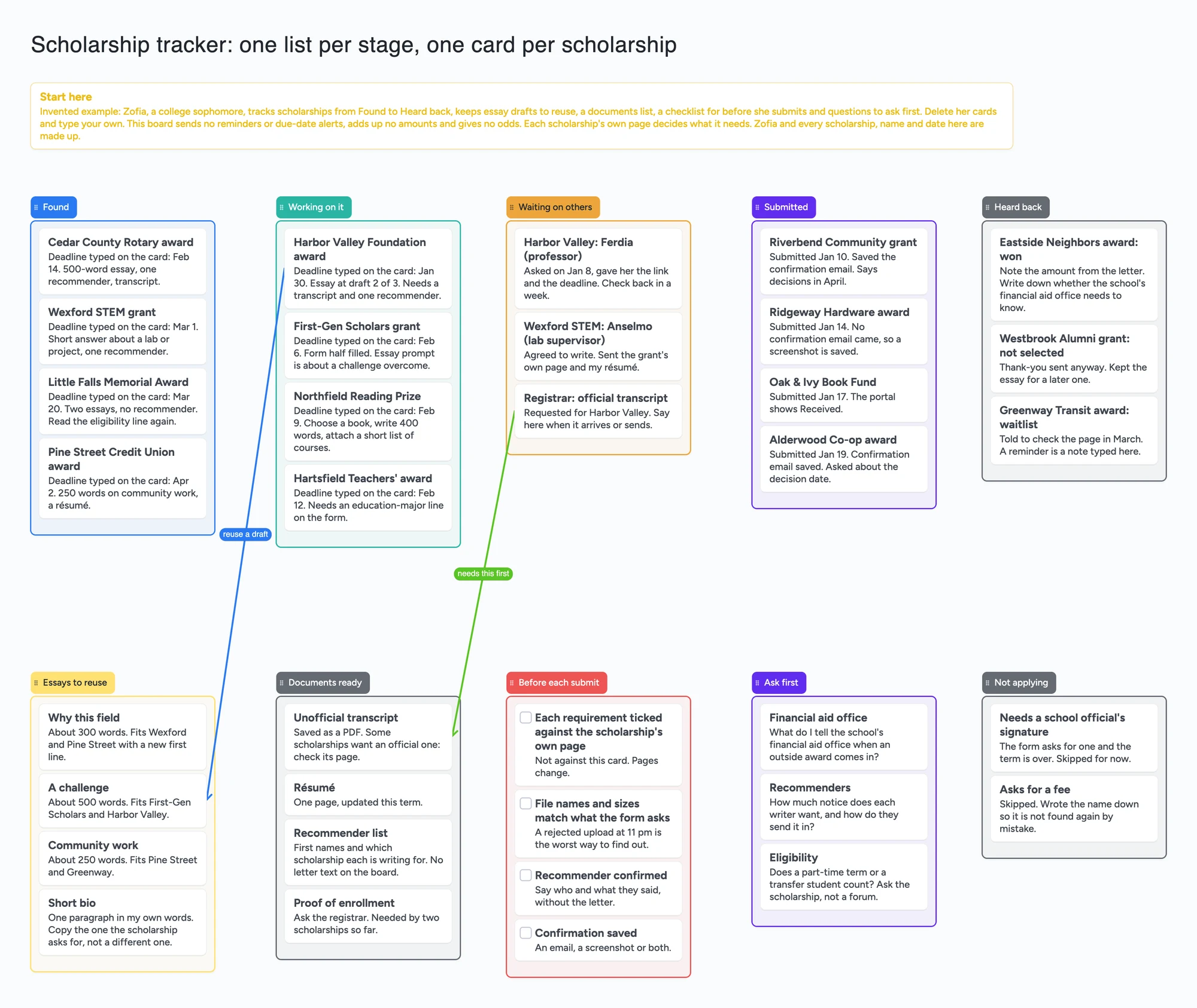
We make Instaboard, an online board. A spreadsheet sorts and adds up better than we do, so that comes first. This page gives you a scholarship tracker already laid out on a board and filled in for one invented student, Zofia: a list for each stage from Found to Heard back, a card for each scholarship with its requirements, a list of essay drafts to reuse, a documents list, a checklist for before you submit and questions to ask first. It sends no reminders or due-date alerts, adds up no award amounts and gives no odds. Each scholarship's own page decides what it needs. It is written for college students 18 and over.
Opens in your browser. Anyone can view; a free sign-in lets you edit.
Updated
Before you copy it: a tracker for the people and the essays
- Spreadsheets win on sorting. One sheet can sort every scholarship by deadline or amount in a single view and add up what you were awarded. On a board, Sort and Filter work on one list at a time, so use a sheet if that is the job.
- It sends no reminders or due-date alerts. A card can carry a due date, a whole day with no time, and the board will not tell you when one is close. Your calendar app has to do that.
- What it is: every scholarship, who you are waiting on and what you can reuse, on one screen that you and anyone you choose can open. Zofia's copy takes 47 of your 150 free items.
- What stays off: no logins or passwords for scholarship portals, no Social Security or bank numbers, no letter text, and no one else's details. Whoever has the link can read a shared board.
- Free plan: 5 boards, 150 items, 3 pictures per board. Copying the board takes 1 of your 5 boards. Writing on it needs a free sign-in. New boards start with "Anyone who joins can view".
What people on r/scholarships say they use
We read two threads in an archived copy. Every reply is one account's view, not research. Among the accounts that replied with text (not counting the two original posters), spreadsheets come from u/Oddria22 and u/Overlordtoad8857 in the first thread and u/Collegiate_Wanderer, who shares one, in the second. Notion comes up from u/mudpies2 (a friend swears by it), u/Sea_End_2676 and, in the second thread, u/E1vl1cT, who says it has a learning curve. u/helpful_tortoise says they used Notion and then describes another tool, with an application kanban board, that "DOES EVERYTHING": we count that as an account promoting a product. u/itsm3404 and u/SSSparks88 use scholarship apps and calendar events, and u/FewCombination5329 a notebook and a notes app.
- r/scholarships "how do you guys organize all your scholarship deadlines and requirements?" (OP u/Janzith, November 24, 2025, UTC; read in an archived copy: 14 comments, 1 removed, 13 with text). The OP writes: "Currently using a spreadsheet but it's becoming a hot mess. I have like 25+ scholarships I'm tracking and keep missing little requirements or getting confused about which essays go where." u/Oddria22, a parent tracking for a son, kept a master spreadsheet with "the scholarship name, link to website, open date, close date, notification date, and any special notes" and a second sheet, colour-coded red, green and tan, for the ones he applied for. u/itsm3404 "was drowning in a spreadsheet" past about 15 applications and moved to a mix of scholarship apps plus Google Calendar for the rest.
- r/scholarships "How to not go crazy—SPREADSHEETS." (OP u/NovaMioda, July 26, 2025, UTC; read in an archived copy: 15 comments). The OP's post begs readers to make a spreadsheet and says "Unless your made of glitter and your a unicorn you will not be able to keep track of dates". The capitals line, "YOU WILL NEVER BE ABLE TO APPLY TO EVERYTHING!! So choose wisely.", is about choosing which scholarships to apply to. u/OVCscholarships adds that the bare minimum is "the name of the scholarship, the date I applied for it, and a Yes/No final decision". u/SSSparks88 puts each opening and deadline in a calendar event that emails them the day it opens and a week before it closes.
Two things in those threads are what the board's lists are built for: requirements missed on a card nobody re-read, and not knowing which essay goes where. The reminders and the sorting stay with the sheet and the calendar.
What a card holds that a spreadsheet row squeezes
A row has one line for a scholarship. On the board each scholarship is a card that can hold what the sheet's notes column ends up holding, and a list is a stage you drag it through.
- A stage you can see. Found, Working on it, Waiting on others, Submitted and Heard back are five lists, and moving a card from one to the next is a drag. A sheet keeps the stage in a column you have to remember to change.
- People you are waiting on as their own cards. Zofia's third list has a professor, a lab supervisor and the registrar. Ferdia's card has the day she asked. A late letter is easy to see because it sits in its own list.
- Essays you can reuse, next to the scholarships. Three drafts, each with a word count and the scholarships it fits, plus a short bio. An arrow with a caption runs from a scholarship card to the draft she plans to reuse.
- A checklist before you submit. Four tick boxes: requirements against the scholarship's own page, file names and sizes, the recommender confirmed, the confirmation saved.
Four trackers we read, and what each says about itself
Each page below was opened in a browser on November 25, 2026. A date is printed here only when the page itself shows one.
| Tracker | What the page says | Better for |
|---|---|---|
| Get Schooled, "Scholarship Application Requirements Tracker" ("Last updated December 10, 2025") | A free tracker "to keep track of deadlines, required materials, and submission details all in one place", as a Google Sheets copy and a Google Docs copy | A sheet you copy and sort yourself |
| Mapping Your Future, scholarship tracking sheet (post dated August 21, 2024) | A spreadsheet to "keep track of the scholarships they are applying for and the scholarship awards received", plus a tab to compare the cost of attendance and financial aid packages at different colleges | Awards received and comparing aid packages, which a card board does not add up |
| College Knowledge Foundation, "Application + Scholarship Tracker" (no date on the page; footer "Copyright (c) 2026") | A download you upload to Google Sheets or Excel, with instructions for recording requirements and deadlines and for managing scholarship submissions. Its home page's tracker block lists "Track Deadlines" with "reminders"; we did not see whether that is this download | A ready sheet from a nonprofit, if you want its layout |
| Notion Marketplace listing "scholarship tracker" by jesssica ("Last updated last year"; 4.9 "Based on 100+ ratings") | Its listing says "deadline reminders and sortable calendar view" and "log and automatically add up your prize money" | Totals, filters and a calendar view, which we do not match |
Swipe the table sideways to see every column.
From each page, read November 25, 2026. What we did not open: the sheets and the Notion template themselves. Their lines are the pages' own claims. Our wording, not theirs.
If your problem is a long list that has to sort and add up, start with one of those. If it is requirements missed, a stage you lose track of and an essay you cannot find, the board holds those side by side.
Zofia's board, list by list
Zofia and everything on her board are invented, including the scholarships, the dates and the people. None of it is real. Read it left to right, top row then bottom row.
- Found, Working on it, Submitted, Heard back. A card per scholarship, 15 in all. The deadline is typed in the card's text in this example to keep it plain; a card can carry a due date instead, which the board does not turn into an alert.
- Waiting on others. Three cards: two recommenders by first name and the registrar's transcript. Ferdia's card has the day she asked.
- Essays to reuse. Three drafts with a word count and the scholarships each one fits, plus a short bio.
- Documents ready. A transcript, a résumé, a recommender list and proof of enrollment. The recommender card holds first names and nothing the writer wrote.
- Before each submit. Four tick boxes. A tick carries no name or time, and a person who can edit can untick it.
- Ask first. Three questions she types answers under: what to tell the financial aid office, how much notice recommenders want, and whether a part-time term or a transfer student counts.
- Not applying. Two cards, one with a form that wants a school official's signature and one that asks for a fee, kept so she does not find them again by mistake.
- Two arrows with captions. One runs from a scholarship card into the essay she plans to reuse, the other from the transcript request into the documents list.
The pre-submit list is the part to keep
The OP in r/scholarships 1p5fi86 says the trouble is "little requirements". The board's answer is one rule on the checklist card: tick each requirement against the scholarship's own page, not against the card. A card can be out of date the day after you write it, and a page can change after you copy it.
Keep the confirmation. Zofia's Submitted cards say whether the portal showed Received, whether an email came, or whether she saved a screenshot. The board stores the note, not the proof, so keep the email or the screenshot in your own files.
What stays off a scholarship board you share
Anyone holding the link to a shared board can read it. The rules on this page are ours, not legal or financial advice, and each scholarship's and your school's rules come first.
- No portal logins or passwords.
- No Social Security, bank or tax numbers.
- No letter text. The list holds first names of people who agreed, not what they wrote.
- No other people's details. Recommenders appear by first name and role only.
- No aid or tax advice. What an award does to your financial aid is a question for the financial aid office, which is why Zofia has an Ask first list.
Zofia's order for filling it in
- Open the board and sign in free when it asks you to write. Delete Zofia's cards and keep the lists.
- Put every scholarship you have found on a card in Found. Type the deadline and the requirements from the scholarship's own page.
- Move a card to Working on it when you start, and to Waiting on others when a recommender or an office has the next move.
- Write your essay drafts under Essays to reuse with a word count and where each one fits.
- Before each submit, go through the four ticks against the scholarship's own page, then untick them for the next one.
- After you send it, move the card to Submitted and type what you saw: Received, an email, a screenshot.
- To share it, switch Share to "Anyone who joins can edit" only for a parent or counsellor who needs to add cards; they sign in with a free account to do it.
Fifteen scholarships or forty: what that does to the 150
Each card and each list is 1 of your 150 free items, across all your boards. The title text box counts too. Arrows, sections and pen strokes don't. Moving a card between lists does not change the count. Our arithmetic from the example:
- As built: 10 lists, 36 cards and 1 title make 47 items; 15 of the cards are scholarships.
- 25 scholarships: the OP above is tracking "25+". With 25 scholarship cards and the other 21 cards unchanged, that is 25 + 21 + 10 + 1 = 57.
- 40 scholarships: 40 + 21 + 10 + 1 = 72.
- More than one copy: every extra copy adds another 47. Three come to 141, and a fourth reaches 188, past the 150 limit. Each copy also uses 1 of your 5 boards.
- Past 150: Pro removes the item limit.
What stays with the sheet and the calendar
- No reminders or due-date alerts. It does not know a deadline is tomorrow.
- No totals. Nothing adds up amounts, awards or aid.
- No sorting across lists. Sort and Filter work on one list at a time, so there is no single view of every scholarship by deadline.
- No scholarship search. It does not find scholarships or tell you whether you qualify.
- No submitting. It does not talk to any scholarship's portal.
- A copy keeps its ticks, and a tick shows neither who nor when, so clear them before you reuse the board.
- Not private by default. New boards start with "Anyone who joins can view".
- A copy takes 1 of your 5 free boards, and the example uses none of the 3 pictures allowed per board.
Start from the ready board
It opens in your browser in a few seconds, with nothing to install. Sign in for free when you want to save it and share it.
Questions
What should a scholarship tracker include?
Each source we read lists something different. Get Schooled's tracker is for deadlines, required materials and submission details; College Knowledge's is for requirements and deadlines; Mapping Your Future's tracks the scholarships you applied for and the awards received. In r/scholarships, u/OVCscholarships says the bare minimum is the scholarship's name, the date applied and a yes or no decision. A board adds a list for each stage and a card for each scholarship so the requirements sit with it.
Is a spreadsheet or a board better for scholarships?
A spreadsheet is better for sorting every scholarship by deadline and for adding up awards. A board is better for seeing stages, the people you are waiting on and the essays you can reuse. Several accounts in the two r/scholarships threads we read use a spreadsheet and several others mention Notion; use both if you want.
Does the board remind me of deadlines?
No. A card can carry a due date, but the board sends no reminders or due-date alerts, so copy each date into a calendar app.
Does it add up the money I have won?
No. Nothing on the board adds up amounts. Type the amount on the card and use a sheet if you want a total.
Can a friend or a counselor write on it?
Yes. New boards start with "Anyone who joins can view", so anyone with the link can read it. Set it to "Anyone who joins can edit" if they should write; each person who writes signs in for free. Keep logins and letter text off it.
Is Instaboard free?
Yes. The free plan includes 5 boards, 150 cards and items across your account (pen strokes, arrows and sections don't count), 3 images and 1 file per board, unlimited collaborators and video calls up to an hour. Pro is $5 a month billed yearly ($59.99 a year), or $7.99 monthly, and the people you invite join free.
Sources
- r/scholarships: how do you guys organize all your scholarship deadlines and requirements? (OP u/Janzith, November 24, 2025; replies are single accounts; read in an archived copy: 14 comments, 1 removed, 13 with text; post dated UTC; November 25, 2026)
- r/scholarships: How to not go crazy—SPREADSHEETS. (OP u/NovaMioda, July 26, 2025; replies are single accounts; read in an archived copy: 15 comments; post dated UTC; November 25, 2026)
- Get Schooled: Scholarship Application Requirements Tracker ("Last updated December 10, 2025"; read November 25, 2026)
- Mapping Your Future: Updated scholarship tracking sheet now available (August 21, 2024; read November 25, 2026)
- College Knowledge Foundation: Application + Scholarship Tracker (page shows no date; footer "Copyright (c) 2026"; its home page also read, November 25, 2026)
- Notion Marketplace: scholarship tracker by jesssica ("Last updated last year"; read in a browser November 25, 2026; the template itself not opened)